A generic but configurable emoji picker for Flutter
- Dart 98.4%
- HTML 1%
- Nix 0.6%
| Filename | Latest commit message | Latest commit date |
|---|---|---|
| .widget_preview | ||
| assets | ||
| lib | ||
| scripts | ||
| .envrc | ||
| .gitignore | ||
| .metadata | ||
| analysis_options.yaml | ||
| CHANGELOG.md | ||
| flake.lock | ||
| flake.nix | ||
| LICENSE | ||
| pubspec.lock | ||
| pubspec.yaml | ||
| README.md | ||

A configurable emoji picker for Flutter. It defaults to Unicode emojis sourced from gemoji, but can be extended with custom emojis rendered as arbitrary Flutter widgets.
Features
- Up-to-date Unicode emojis, sourced from gemoji
- Custom emoji categories that can be prepended or appended to the default categories
- Custom emojis can be rendered as arbitrary Flutter widgets, supporting images, GIFs, stickers, and more
- Recent emojis can be easily implemented using
prependCategories - Optional free-text selection
- Designed for high performance using slivers and a custom scroll listener
- Sleek Material 3 design
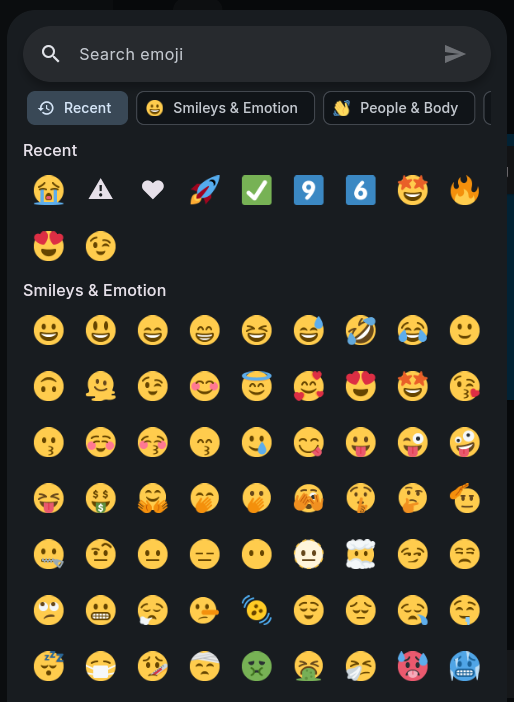
Getting started
Add the package to your project with flutter pub get.
Usage
EmojiPicker is can be used in a variety of contexts, including bottom sheets, dialogs, or directly in your widget tree.
For example, using it as a bottom sheet:
showModalBottomSheet(
  isScrollControlled: true,
  context: context,
  builder: (context) => EmojiPicker(
    onSelection: (emoji) {
      Navigator.of(context).pop();
      message.sendReaction(emoji.value);
    },
  ),
);
Custom emojis
Custom categories can contain Emoji objects whose widget can be any Flutter widget. This makes it possible to use image-based emojis, GIFs, stickers, or other custom visual representations:
Emoji(
  widget: Image.network('https://example.com/blob.webp'),
  value: ':blob:',
  aliases: ['blob'],
  description: 'Blob',
  tags: ['custom', 'blob'],
  data: blobImage, // Optional, passed back to onSelection
)
To pick from only your own categories, like a sticker picker, turn off the default emojis:
EmojiPicker(
  prependCategories: stickerCategories,
  includeDefaultEmoji: false,
  itemSize: 96,
  searchHint: "Search stickers",
  onSelection: (sticker) => sendSticker(sticker.data as StickerImage),
)
Accepted Parameters
IList<EmojiCategory> prependCategories: Categories to prepend to the default emoji listIList<EmojiCategory> appendCategories: Categories to append to the default emoji listrequired FutureOr<void> Function(Emoji emoji) onSelection: Function to be called with the selected emojiFutureOr<void> Function(String text)? onFreeText: If set, allows submitting the search text as is, calling this with itbool includeDefaultEmoji = true: Whether to show the default emojis afterprependCategoriesdouble itemSize = 56: The width and height of each item in the gridString searchHint = "Search emoji": Placeholder text for the search bar