- QML 86.8%
- JavaScript 6.9%
- Nix 6.3%
| Filename | Latest commit message | Latest commit date |
|---|---|---|
| docs | ||
| src | ||
| .gitignore | ||
| flake.lock | ||
| flake.nix | ||
| location-agent.js | ||
| package.nix | ||
| README.md | ||

quadshell
A phone shell for niri, built with Quickshell. It's a status bar with a quick settings sheet that you pull down from it.
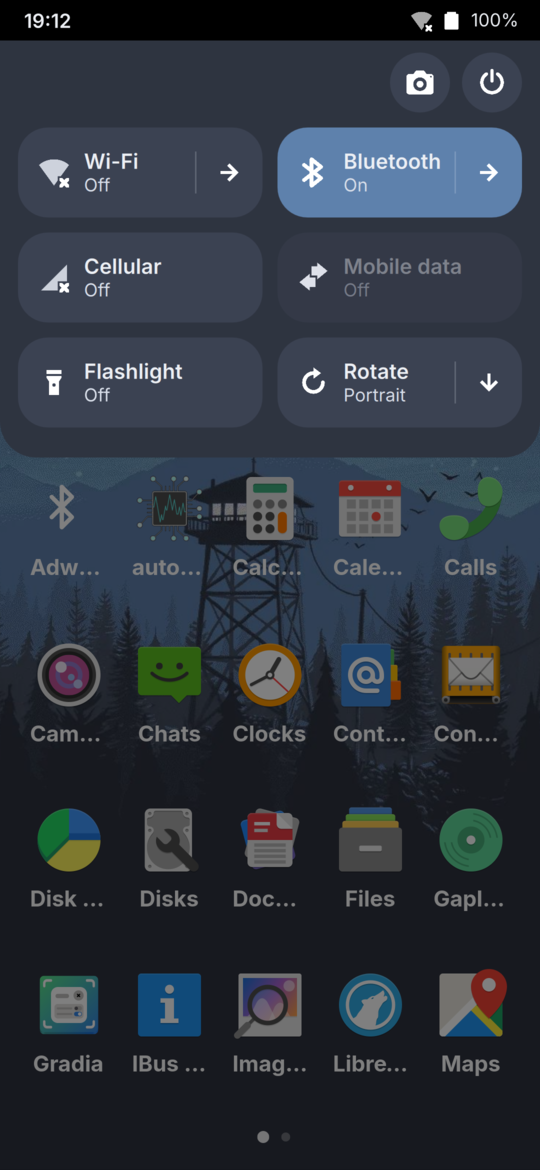
The bar shows the time, cellular, Wi-Fi, Bluetooth and battery. The sheet has:
- Brightness and volume sliders. Tap the speaker icon to mute, and the arrow next to it picks the output, out of the ones that are plugged in.
- Wi-Fi, Bluetooth, cellular and mobile data toggles. The arrow on Wi-Fi opens
nmgui, and on Bluetooth it opensadw-bluetooth. - Location, which decides whether apps get your location through GeoClue. The bar shows an icon while one is using it.
- Do not disturb, which stops notifications popping up. They still go into the sheet.
- A flashlight
- Rotation, with a choice of orientations
- Screenshot and power (suspend, restart, power off) buttons
- Your notifications
Drag the bar down to open the sheet, and swipe up anywhere or tap below it to close it. You can
also toggle it with qs ipc call sheet toggle.
It's also the notification server. New notifications pop up under the bar for a few seconds, or until you dismiss them if they're urgent. Swipe one up to put it away early. Swipe a notification sideways to dismiss it, in the sheet or as a popup, and tap it to open it.
And it's the lockscreen. It locks as soon as it starts, when logind asks it to (before
suspending, or with loginctl lock-session), and with qs ipc call lock lock. The lockscreen
has the clock, a password field and your notifications.
Using it
The flake has a quadshell package, and an overlay that adds it to nixpkgs:
nixpkgs.overlays = [ quadshell.overlays.default ];
Then start it with niri, in your niri config:
spawn-at-startup "quadshell"
The lockscreen shows whatever image swaybg is showing (its -i argument), blurred.
It brings nmcli, mmcli, pw-dump and nmgui with it. The system needs:
-
niri, NetworkManager, ModemManager and PipeWire running
-
systemd-logind, which the flashlight and brightness slider use to set the LED and backlight without root
-
The
loginPAM service, which checks the lockscreen's password -
The Papirus-Dark icon theme and the Inter font
-
An on-screen keyboard that uses text-input-v3, like Stevia, to type the password
-
No other notification daemon, like swaync or mako, as only one can run at a time
-
adw-bluetooth for the Bluetooth arrow, with its daemon:
services.adw-bluetooth.enable = true; -
GeoClue, with quadshell as its agent, for the location toggle:
services.geoclue2 = {
  enable = true;
  enableDemoAgent = false;
  whitelistedAgents = [ "quadshell" ];
};
Developing
nix run .#phone [host]
This copies src to the phone over SSH (host defaults to phone) and runs it there, showing
its logs until you press Ctrl+C. It stops any other running Quickshell first, so when you quit
there's no bar until you run it again. The phone needs Quickshell from this flake's nixpkgs
already in its store. The location agent gets built on the phone, from things this machine copies
over, so the phone doesn't need to download anything.
Editor support
For completion and lints in VS Code, install the Qt Qml extension and point it at qmlls from
qt6.qtdeclarative. Then create an empty src/.qmlls.ini and run Quickshell on this machine once:
nix run --inputs-from . nixpkgs#quickshell -- --path src
Quickshell fills in .qmlls.ini with its import paths. That file links into /run, so do this
again after a reboot.