Extras
- with `npx tailwindcss init --full` we can have full configuratio of properties available at `tailwind.config.js` and we can add some properties with their values too like
```js
// in theme
fontSize: {
mammoth: ["10rem", { lineHeight: "1" }],
xs: ["0.75rem", { lineHeight: "1rem" }],
sm: ["0.875rem", { lineHeight: "1.25rem" }],
base: ["1rem", { lineHeight: "1.5rem" }],
lg: ["1.125rem", { lineHeight: "1.75rem" }],
xl: ["1.25rem", { lineHeight: "1.75rem" }],
"2xl": ["1.5rem", { lineHeight: "2rem" }],
"3xl": ["1.875rem", { lineHeight: "2.25rem" }],
"4xl": ["2.25rem", { lineHeight: "2.5rem" }],
"5xl": ["3rem", { lineHeight: "1" }],
"6xl": ["3.75rem", { lineHeight: "1" }],
"7xl": ["4.5rem", { lineHeight: "1" }],
"8xl": ["6rem", { lineHeight: "1" }],
"9xl": ["8rem", { lineHeight: "1" }],
},
```
here under fontSize we added mammoth so when we type `text-mammoth` in html we will get font-size as 10rem with line-height of similar size(10 rem in this case).
- instead of directly modyfying full tailwind.config.js we can do same with empty one which is created without using `full` flag.
```js
/** @type {import('tailwindcss').Config} */
module.exports = {
content: ["./public/**/*.{html,js}"],
theme: {c
extend: {
colors: {
primary: "#FF6363",
secondary: {
100: "#E2E2D5",
200: "888883",
},
},
},
},
plugins: [],
};
```
in html
```html
```
- **custom fonts**
in src/style.css import the font with CDN like this
```css
@import url(https://cdn.jsdelivr.net/fontsource/fonts/nunito:vf@latest/latin-wght-normal.woff2);
```
then in tailwind.config.js add this
```js
/** @type {import('tailwindcss').Config} */
module.exports = {
content: ["./public/**/*.{html,js}"],
theme: {
extend: {
fontFamily: {
body: ["Nunito"],
},
},
},
plugins: [],
};
```
finally in html
`` this will add the font 'Nunito'
- **@apply Directive**
just like mixin in sass we can use apply directive to inherit the properties of other classs
in src/styles.css
```css
@import url(https://cdn.jsdelivr.net/fontsource/fonts/nunito:vf@latest/latin-wght-normal.woff2);
@tailwind base;
@tailwind components;
@tailwind utilities;
.card {
@apply relative bg-white rounded overflow-hidden shadow-md;
}
.badge {
@apply bg-secondary-100 text-secondary-200 text-xs uppercase font-bold rounded-full p-2 absolute top-0 ml-2 mt-2;
}
```
in public/index.html
```html
5 Bean Chili StewRecipe by Mario
25 mins
```
to fix bluish nature when using gray do this
```js
const colors = require('tailwindcss/colors')
module.exports = {
theme: {
extend: {
colors: {
// This overrides 'gray' classes to use the flat 'neutral' color palette instead
gray: colors.neutral,
},
},
},
}
```
- **Tailwind components**
https://merakiui.com/components
https://daisyui.com/
https://demos.creative-tim.com/soft-ui-design-system/presentation.html
https://www.hyperui.dev/
https://daily.dev/blog/10-free-tailwind-css-ui-kits-and-component-libraries-2024
[10 Free Tailwind CSS UI Kits & Component Libraries 2024 (15_3_2025 11_21_40 pm).u.zip.html](../../../../_resources/10%20Free%20Tailwind%20CSS%20UI%20Kits%20&%20Component%20Libraries.html)
for !important use this
`ml-auto` to `!ml-auto`
tailwind group
eg:
```html
Hover over me!
```
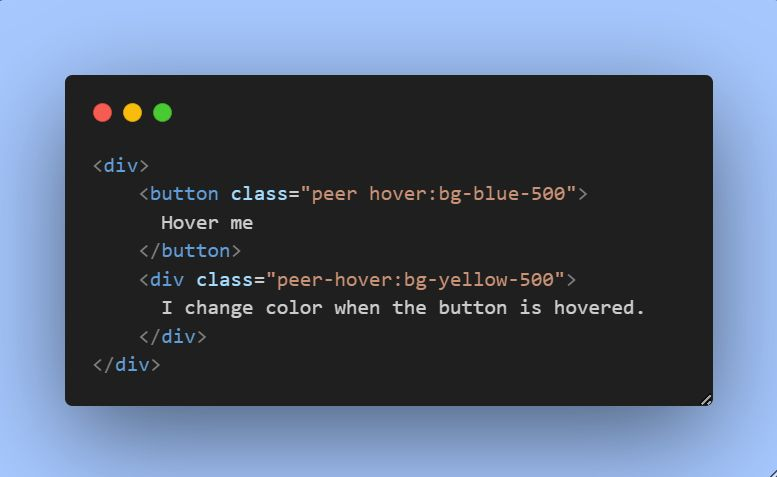
tailwind peer class
The peer class in Tailwind CSS is a modifier used to style an element based on the state of its sibling elements. Group allows child elements to react to the state of their parent
Peer allows an element to react to the state of its sibling.
```html
```
to increase specificity
using `[&&]` or `[&]`
`
