Coding 4 (Spring REST telusko)
- Creating a sample form which will send data to controller and controller will store it in database
- Added a get method to return records when id is given as request so a new view is added too
Creating POJO class at `src/main/com/example/demo/model`
```java
package com.example.demo.model;
public class Alien {
private int aid;
private String aname;
public int getAid() {
return aid;
}
public void setAid(int aid) {
this.aid = aid;
}
public String getAname() {
return aname;
}
public void setAname(String aname) {
this.aname = aname;
}
@Override
public String toString() {
// TODO Auto-generated method stub
return String.format("Alien [aid=%d] [aname=%s]",aid,aname);
}
@Override
public boolean equals(Object obj) {
// TODO Auto-generated method stub
Alien alien = (Alien) obj;
// for String or any non primitive type like Integer,Long,etc its necessary to check using equals method as by default
// == will check equality of reference not their value
if( alien.getAid()==this.aid && this.aname.equals(alien.getAname()))
{
return true;
}
else{
return false;
}
}
}
```
Creating a view `home.html` at `src/main/resources/templates`
```html
Document
```
Creating a view `showAlien.html` at `src/main/resources/templates`
```html
Document
```
Creating a class to handle database operations named `TableLoader` at `src/main/com/example/demo/model`
```java
package com.example.demo.model;
import java.sql.ResultSet;
import java.sql.SQLException;
import java.util.List;
import org.springframework.beans.factory.annotation.Autowired;
import org.springframework.jdbc.core.JdbcTemplate;
import org.springframework.jdbc.core.RowMapper;
import org.springframework.stereotype.Component;
@Component
public class TableLoader {
final String TableName="alien";
@Autowired
JdbcTemplate jdbcTemplate;
public void createTable(){
jdbcTemplate.execute(String.format("drop table if exists %s; create table alien (AID serial, ANAME text)",TableName));
}
public void fillInitialData(){
jdbcTemplate.update("insert into alien (ANAME) values (?)", "navin");
}
public void insertData(Alien alien){
jdbcTemplate.update("insert into alien (ANAME) values (?)", alien.getAname());
}
public Alien findById(int aid){
List resList = jdbcTemplate.query("select * from alien where AID=?", new RowMapper() {
@Override
public Alien mapRow(ResultSet rs, int rowNum) throws SQLException{
Alien alien= new Alien();
alien.setAid(rs.getInt("AID"));
alien.setAname(rs.getString("ANAME"));
return alien;
}
},aid);
return resList.get(0);
}
}
```
Creating controller `AlienController`
```java
package com.example.demo.controller;
import org.springframework.beans.factory.annotation.Autowired;
import org.springframework.stereotype.Controller;
import org.springframework.web.bind.annotation.RequestMapping;
import com.example.demo.model.Alien;
import com.example.demo.model.TableLoader;
@Controller
public class AlienController {
@Autowired
TableLoader tl;
@RequestMapping("/")
public String home(){
return "home";
}
@RequestMapping("/addAlien")
public String addAlien(Alien alien){
tl.insertData(alien);
return "home";
}
@RequestMapping("/getAlien")
public ModelAndView getAlien(@RequestParam int aid){
ModelAndView mv= new ModelAndView("showAlien");
Alien alien = tl.findById(aid);
System.out.println("Alien: "+alien.toString());
mv.addObject(alien);
return mv;
}
}
```
Finally our spring boot app class
```java
package com.example.demo;
import org.springframework.boot.SpringApplication;
import org.springframework.boot.autoconfigure.SpringBootApplication;
import org.springframework.context.ConfigurableApplicationContext;
import com.example.demo.model.TableLoader;
@SpringBootApplication
public class DemoApplication {
public static void main(String[] args) throws Exception {
ConfigurableApplicationContext context =SpringApplication.run(DemoApplication.class, args);
TableLoader tl= context.getBean(TableLoader.class);
tl.createTable();
tl.fillInitialData();
}
}
```
- Optimizing findById method
- Create a separate class called `AlienRowMapper` which implments RowMapper interface and override mapRow method to map it to Alien class object (ResultSet -> Alien )
```java
package com.example.demo.model;
import java.sql.ResultSet;
import java.sql.SQLException;
import org.springframework.jdbc.core.RowMapper;
public class AlienRowMapper implements RowMapper{
@Override
public Alien mapRow(ResultSet rs, int rowNum) throws SQLException {
Alien alien = new Alien();
alien.setAid(rs.getInt("AID"));
alien.setAname(rs.getString("ANAME"));
return alien;
}
}
```
Modify method
```java
public Alien findById(int aid){
Alien alien = jdbcTemplate.queryForObject("select * from alien where AID=?", new AlienRowMapper(),aid);
return alien;
}
```
### GET methods
- Make sure to use either GetMapping or include GET in method parameter of RequestMapping to prevent conflict between same path but of different method requests
in `AlienController`
```java
// get methods
@RequestMapping("/aliens")
@ResponseBody
public String getAliens(){
return tl.findAll().toString();
}
@RequestMapping(path="/alien/{aid}",method = RequestMethod.GET,produces = {"application/json"})
@ResponseBody
public String getAlienByParam(@PathVariable("aid") int aid){
return tl.findById(aid).toString();
}
```
in `TableLoader`
```java
public List findAll(){
return jdbcTemplate.query("select * from alien",new AlienRowMapper());
}
```
- optional class : https://www.javatpoint.com/java-8-optional
- spring boot have jackson-core class to handle java objects by converting them to json when passed as response
- in `AlienController`
```java
@RequestMapping("/getAlien")
public ModelAndView getAlien(@RequestParam int aid){
ModelAndView mv= new ModelAndView("showAlien");
Optional alienOption = tl.findById(aid);
Alien alien=alienOption.get();
System.out.println("Alien: "+alien.toString());
mv.addObject(alien);
return mv;
}
// get methods
@RequestMapping("/aliens")
@ResponseBody
public List getAliens(){
return tl.findAll();
}
// with Optional container if there is no object to be returned is null then it will handle that too
@RequestMapping("/alien/{aid}")
@ResponseBody
public Optional getAlienByParam(@PathVariable("aid") int aid){
return tl.findById(aid);
}
```
in `TableLoader`
```java
public Optional findById(int aid){
Alien alien = jdbcTemplate.queryForObject("select * from alien where AID=?", new AlienRowMapper(),aid);
return Optional.ofNullable(alien);
}
```
### Content Negotiation
- To tell server or client what type of content needs to be sent or accepted
- jackson-core handle json but not xml so if accept type for response is xml then another package ie jackson dataformat xml need to be installed too. so add following in `pom.xml`
```xml
com.fasterxml.jackson.dataformat
jackson-dataformat-xml
2.17.2
```
- at server side if we wanna give a response of particular content type so that it is restricted to that only(if client wants json and restriction at server is xml then it will fail).
When passing muliple arguments inside anootation we need to mention argument field too like path,produces,etc
- in `AlienController`
```java
// this is also possible
// @RequestMapping(path="/aliens",produces = {"application/xml","application/json"})
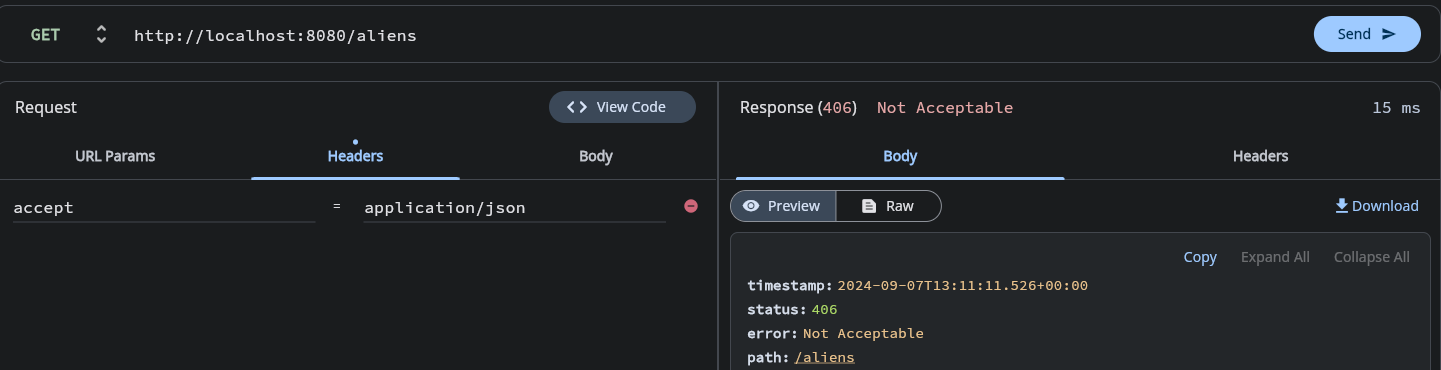
@RequestMapping(path="/aliens",produces = {"application/xml"})
@ResponseBody
public List getAliens(){
return tl.findAll();
}
```
so now u will have this when u try json
## POST Request
- for accepting post requests change that to `RequestMethod.POST`
in `AlienController`
```java
@RequestMapping(path="/alien",consumes = "multipart/form-data", produces = "application/json",method = RequestMethod.POST)
@ResponseBody
public Alien addAlienPOST(Alien alien){
tl.insertData(alien);
return alien;
}
```
for `RequestMapping(path="path1", method=RequestMethod.POST)` there is a shorthand form ie `PostMapping("path1")`
- `multipart/form-data` content is not raw body so whenever we send raw data like json/xml we need to use annotation RequestBody otherwise no value will be catched to instance of alien object
in `AlienController`
```java
@PostMapping("/alien")
@ResponseBody
public Alien addAlienPOST(@RequestBody Alien alien){
tl.insertData(alien);
return alien;
}
```
### PUT and DELETE
- in the following code apprach for put is to save and update means if there is no resource found to be updated then insert operation will take place and new id will be generated and returned
- In order to get the new generated idm object of KeyHolder class needs to be used and pass in update method of jdbctemplate appropiately.
- in update method, preparedstatement way (ie overloading) is to be used.
- findById needs to be modified to use query instead of queryforobject in order to not deal with emptyresultSet exception
in `TableLoader`
```java
public Optional findById(int aid){
List results = jdbcTemplate.query(
"SELECT * FROM alien WHERE AID = ?",
new AlienRowMapper(),
aid
);
return results.stream().findFirst();
}
public void deleteById(int aid){
jdbcTemplate.update("delete from alien where AID=?", aid);
}
public Alien saveOrUpdateData(Alien alien,int aid){
// System.out.println("starting of saveorupdate");
Optional a= this.findById(aid);
// System.out.println("before if");
if(!a.isPresent()){
// System.out.println("starting of if");
String insertSQL= "insert into alien (ANAME) values (?)" ;
KeyHolder keyHolder= new GeneratedKeyHolder();
// System.out.println("Before inserting");
// jdbcTemplate.update(insertSQL, alien.getAname(),keyHolder,"AID");
jdbcTemplate.update(connection->{
PreparedStatement ps=connection.prepareStatement(insertSQL, new String[] {"AID"});
ps.setString(1,alien.getAname());
return ps;
},keyHolder);
// System.out.println("after inserting");
Number generatedID = keyHolder.getKey();
System.out.println("after getting key: "+generatedID.intValue());
return this.findById(generatedID.intValue()).get();
}
else{
jdbcTemplate.update("update alien set ANAME=? where AID=?", alien.getAname(),aid);
return this.findById(aid).get();
}
}
```
in `AlienController`
```java
@DeleteMapping("/alien/{aid}")
@ResponseBody
public Alien deleteAlien(@PathVariable int aid){
Alien a = tl.findById(aid).get();
tl.deleteById(aid);
return a;
}
@PutMapping("/alien/{aid}")
@ResponseBody
public Alien updateAlien(@RequestBody Alien alien, @PathVariable("aid") int aid){
Alien a=tl.saveOrUpdateData(alien,aid);
return a;
}
```
## Spring Data REST
Note : it requires spring data jpa as it is built on top of that
- A way to create REST without controller or spring-web dependency.
- First we will need `rest repositories` dependency so add this in `pom.xml` and install
```xml
org.springframework.boot
spring-boot-starter-data-rest
```
- we need to use annotation `RepositoryRestResource`
syntax is
`@RepositoryRestResource(collectionResourceRel="",path="")`
- this will map the paths with jpaRepository functions so need to make a separate rest controller.
- collectionResourceRel paramater is responsible for generating self and other resource links in response body
in `AlienRepo`
```java
```java
package com.example.demo;
import org.springframework.data.jpa.repository.JpaRepository;
import org.springgramework.data.rest.core.annotation.RepositoryRestResource;
@RepositoryRestResource(collectionResourceRel="aliens",path="aliens")
public interface AlienRepo extends JpaRepository {
}
```
```