
1.7 KiB
1.7 KiB
code
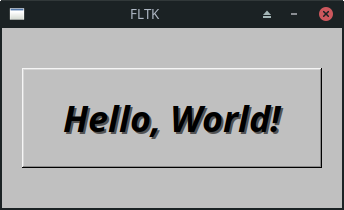
#include <FL/Fl.H>
#include <FL/Fl_Box.H>
#include <FL/Fl_Window.H>

int main(int argc, char **argv) {

  Fl_Window *window = new Fl_Window(300, 180);
  Fl_Box *box = new Fl_Box(20, 40, 260, 100, "Hello, World!");
  box->box(FL_UP_BOX);
  box->labelsize(36);
  box->labelfont(FL_BOLD + FL_ITALIC);
  box->labeltype(FL_SHADOW_LABEL);
  window->end();
  window->show(argc, argv);
  return Fl::run();
}
 more random
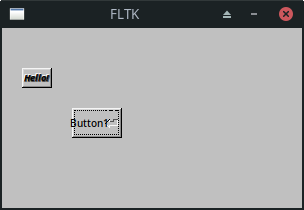
#include <FL/Fl_Return_Button.H>
#include <FL/Fl_Window.H>

int main(int argc, char **argv) {

  Fl_Window *window = new Fl_Window(300, 180);
  Fl_Box *box = new Fl_Box(20, 40, 30, 20, "Hello!");
  box->box(FL_UP_BOX);
  box->labelsize(9);
  box->labelfont(FL_BOLD + FL_ITALIC);
  Fl_Return_Button *retBtn = new Fl_Return_Button(70, 80, 50, 30, "Button1");
  retBtn->type(FL_NORMAL_BUTTON);
  retBtn->labelsize(10);

  box->labeltype(FL_EMBOSSED_LABEL);
  window->end();
  window->show(argc, argv);
  return Fl::run();
}
- To run bash script in C
  #include <cstdlib>  // For the system function

  int main() {
  	// Replace "your_script.sh" with the actual path to your bash script
  	const char* scriptPath = "your_script.sh";

  	// Run the bash script using the system function
  	int result = system(scriptPath);

  	// Check the result of the system call
  	if (result == 0) {
  		// The script was executed successfully
  		// Add your FLTK code or other logic here
  	} else {
  		// There was an error executing the script
  		// Handle the error or display a message
  	}

  	return 0;
  }