
18 KiB
React
-
Forms of react for different devices
react-dom : web browser
react-native: mobile apps including android and ios
react-nodegui: for desktop apps
Creating react app to exe file
-
React-router-dom
Creating structure for routes:
import { Route, Routes, Link, BrowserRouter as Router } from "react-router-dom"; const routing = ( <Router> <Routes> <Route path="/" element={<App />} /> <Route path="/Similar/:name" element={<Similar />} /> </Routes> </Router> ); ReactDOM.render( // <React.StrictMode> routing, /* </React.StrictMode> */ document.getElementById("root") ); // deleivering state to destination page: import {useNavigate} from 'react-router-dom'; const navigate = useNavigate(); navigate(`/Similar/${encodeURI(title)}`, { state: props, }); // getting state from destination page: import { useLocation } from "react-router-dom"; const { state } = useLocation(); const { poster_path, title, vote_average, overview, id } = state; -
No value dynamic attributes in React
For attributes in jsx having no value like disabled in select element
for eg:
<select    name=""  id="brands"  disabled >
<option value="brands"></option>
</select>
If we want the disabled due to be dynamic means it should be disabled on basis of given condition then
<select
          name=""
          id="brands"
          onChange={selectBrand}
          disabled={isBrandDisabled}
        >
Here isBrandDisabled is boolean value
-
passing other parameters in a callback function for events like onclick or onchange
<input className="inputQty" type="number" name="" id="" defaultValue={0} onChange={(e)=>{ func(e,arg1); }} -
Caution for storing component in state
Its advisable to not store react component in state like
const [comp,setComp]= useState(null)

setComp(Comp)
Here Comp is React component. Problem with this is when we try to pass setState hook or class method then setstate may not work as state may not store such complex things
-
Practical example showing importance of keys
Keys help React identify which items have changed, are added, or are removed. Keys should be given to the elements inside the array to give the elements a stable identity:
For eg: If we have list of child components having their own state which are rendered dynamically according to the data which can be changed due to events.
If data is changed, suppose item is deleted so that particular component is deleted at position say 2. Then when re-rendering, component which was at position 3, will be in position 2. So now state of component which was in position 2, that state will be used as position is same.
Proof:
import React from 'https://cdn.skypack.dev/react';
import ReactDOM from 'https://cdn.skypack.dev/react-dom';

const {useState} =React

const Item=(props)=>{
  const {item,setItems,items}=props
  const [qty,setQty]=useState(0)

  return(
         <div className="item">
         <span>{item}: </span>
         <span>{qty}</span>

         <button style={{marginLeft: '1rem'}} onClick={()=>{
          setQty(qty+1)
         }}>+</button>
          <button onClick={()=>{
            const newItems=items.filter((ele)=>ele!==item)
          setItems(newItems)
         }}>X</button>
         <br/>
         </div>
         )

}

// key={item}

const App = () => {

  const [items,setItems]=useState (['strawberry','apple','orange','grapes','pear'])

  const itemsarray=items.map((item)=>{
    return(
    <Item  item={item} items={items} setItems={setItems}/>)
  })

  return (
    <div className="App">
      {itemsarray}
    </div>
  );
}

ReactDOM.render(<App />, document.getElementById("root"));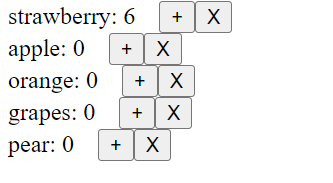
After deleting 1st item:
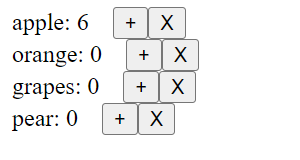
As we can see state ‘qty’ dont get deleted as here component are identified only due to position. So we need to provide the key to uniquely identify them
import React from 'https://cdn.skypack.dev/react';
import ReactDOM from 'https://cdn.skypack.dev/react-dom';

const {useState} =React

const Item=(props)=>{
  const {item,setItems,items}=props
  const [qty,setQty]=useState(0)

  return(
         <div className="item">
         <span>{item}: </span>
         <span>{qty}</span>

         <button style={{marginLeft: '1rem'}} onClick={()=>{
          setQty(qty+1)
         }}>+</button>
          <button onClick={()=>{
            const newItems=items.filter((ele)=>ele!==item)
          setItems(newItems)
         }}>X</button>
         <br/>
         </div>
         )

}

const App = () => {

  const [items,setItems]=useState (['strawberry','apple','orange','grapes','pear'])

  const itemsarray=items.map((item)=>{
    return(
    <Item key={item}  item={item} items={items} setItems={setItems}/>)
  })

  return (
    <div className="App">
      {itemsarray}
    </div>
  );
}

ReactDOM.render(<App />, document.getElementById("root"));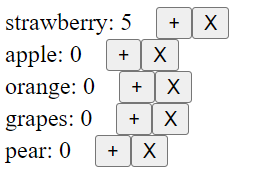
After deleting ‘strawberry’:
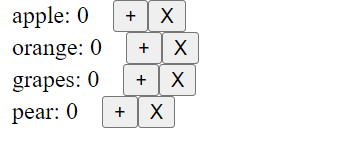
-
render parent component when child state is changed.
Normally when parent component is re-rendered, child component also get rendered.
Proof:
import React from 'https://cdn.skypack.dev/react';
import ReactDOM from 'https://cdn.skypack.dev/react-dom';
// import {useState} from 'https://cdn.skypack.dev/react'

const {useState} =React

const Child=(props)=>{

  const [state,setState]=useState(0)

  console.log('Child component rendered')
  return(
        <div className="child">
          <div className="">Child</div>
          <button onClick={()=>{
            console.log('child button clicked')
        setState(state+1)
      }} className="">{state}</button>
        </div>


      )
}

const App = () => {
  const [state,setState]=useState(0)

  console.log('\nParent component rendered')
  return (
    <div>
      <button onClick={()=>{
        console.log('Parent button clicked')
        setState(state+1)
      }}>{state}</button>
      <Child/>
    </div>
  );
}

ReactDOM.render(<App />, document.getElementById("root"));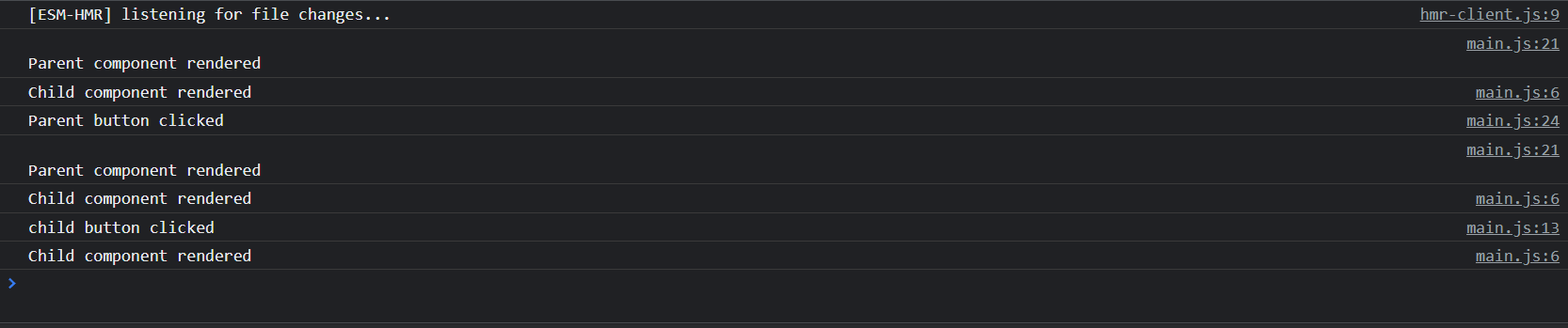
To stop rerendering: use React.memo() while exporting child component in Child.js file
import React from "react";

function Child(props) {
  console.log("child component");
  return <div className="App">child Page</div>;
}

export default React.memo(Child);
When child component is updated then parent component is not updated as we can see from console output.
So to update the parent component when child component is updated.
If we want to rerender parent component for any child state changes then we can pass any state like render and setRender from parent to child and change that state in child component when child state changes thus updating parent component too.
const Child=({setRender,render})=>{

  const [state,setState]=useState(0)

  useEffect(() => {

      setRender(render+1)

  }, [state])

  console.log('Child component rendered')
  return(
        <div className="child">
          <div className="">Child</div>
          <button onClick={()=>{
            console.log('child button clicked')
        setState(state+1)
      }} className="">{state}</button>
        </div>


      )
}

const App = () => {
  const [state,setState]=useState(0)
  const [render,setRender]=useState(0)

  console.log('\nParent component rendered')
  return (
    <div>
      <button onClick={()=>{
        console.log('Parent button clicked')
        setState(state+1)
      }}>{state}</button>
      <Child setRender={setRender} render={render}/>
    </div>
  );
}

ReactDOM.render(<App />, document.getElementById("root"));
-
Animation
Tilt and Particles:
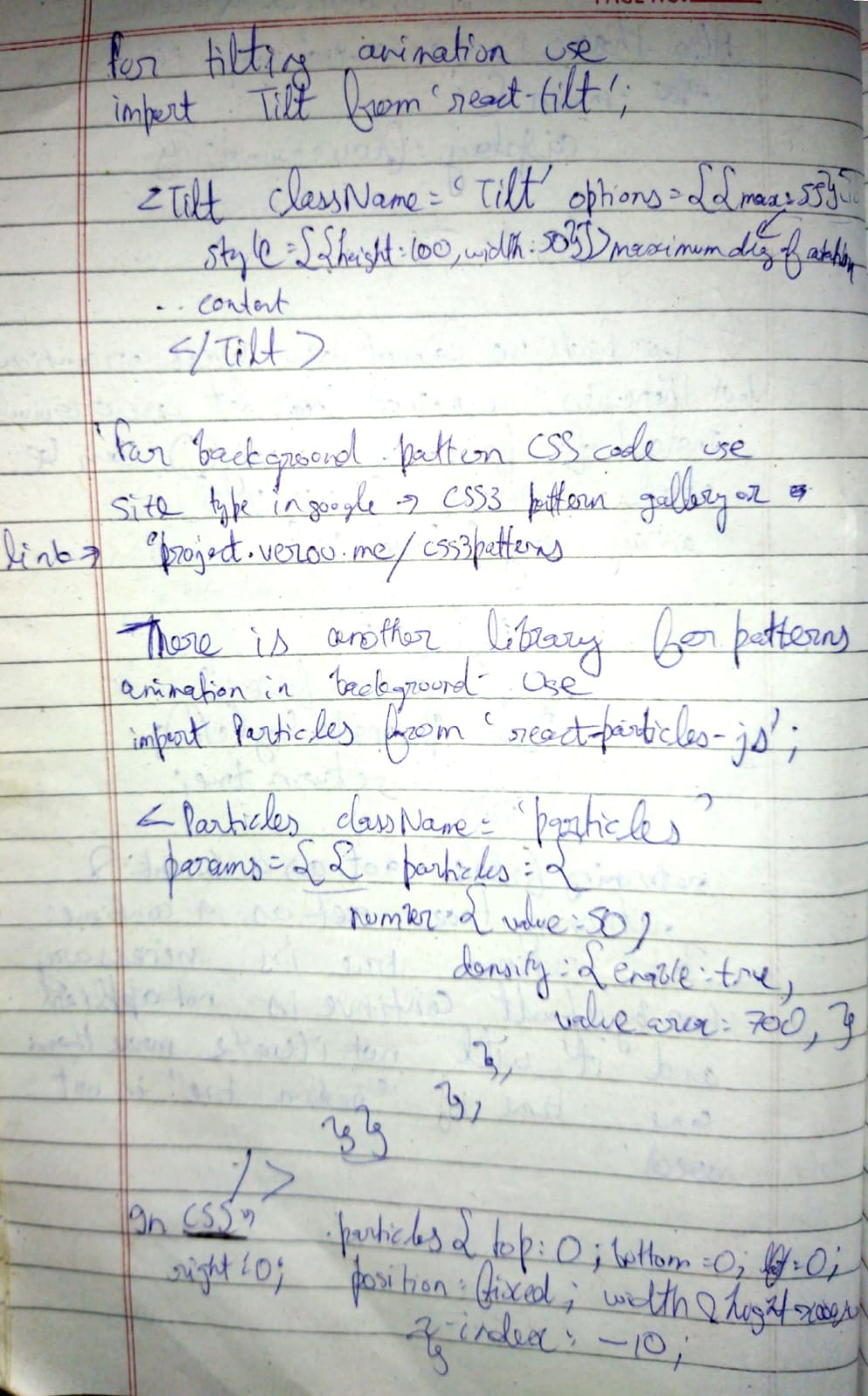
For GUI testing in particles.js use:
-
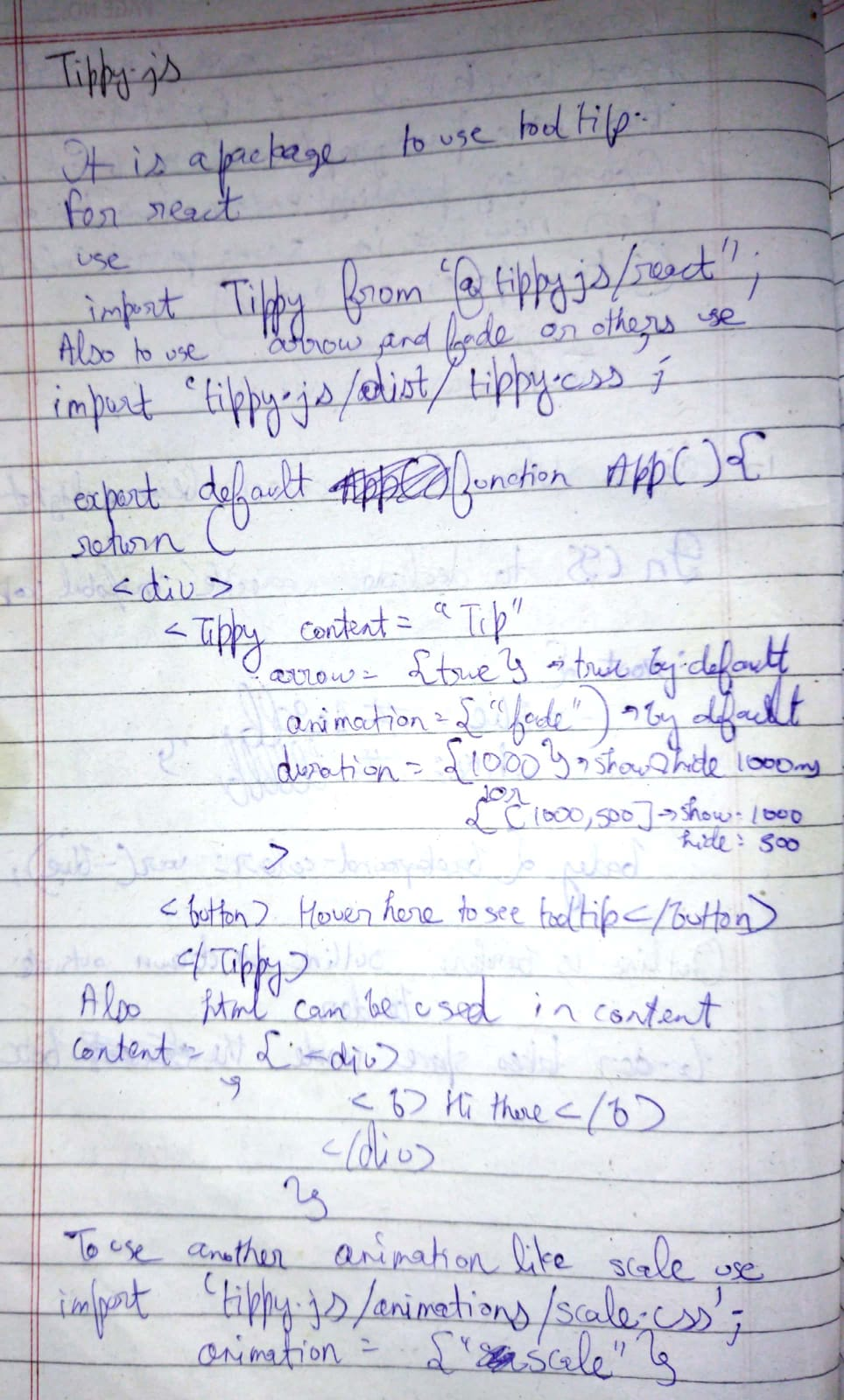
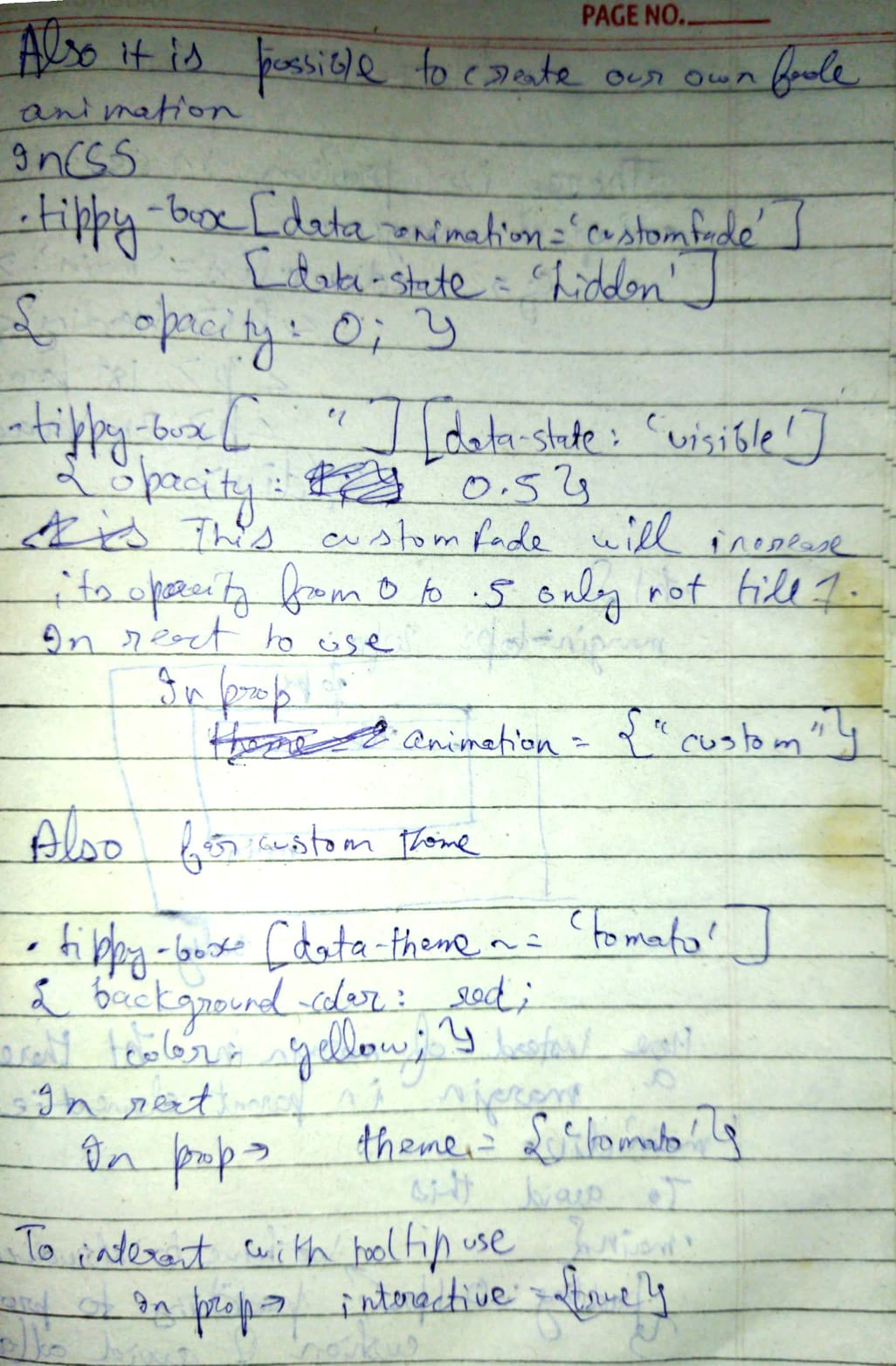
tippyjs
-
Equivalent of useEffect
For eg: using useeffect:
import { useState, useEffect, Fragment } from "react";
import "./styles.css";

export default function App() {
  const [int, setInt] = useState(0);

  useEffect(()=>{
    console.log(int)
  },[int])

  const handleClick=()=>{
    setInt(int+1)
  }

  return (
    <div className="App">
      <h1>Hello CodeSandbox</h1>
      <h2 onClick={handleClick}>Start editing to see some magic happen!</h2>
    </div>
  );
}
same using componentDidUpdate()
import "./styles.css"; import {Component} from 'react' class App extends Component { constructor(){ super() this.state={ int: 0 } // this.handleClick=this.handleClick.bind(this) } handleClick=()=>{ this.setState({int: this.state.int+1}) // console.log(this.state.int) } componentDidMount(){ console.log(this.state.int) } // for checking props, prevProps is used instead of prevState componentDidUpdate(prevState){ if(this.state.int!==prevState.int){ console.log(this.state.int) } } render(){ return( <div className="App"> <h1>Hello CodeSandbox</h1> <h2 onClick={this.handleClick}>Start editing to see some magic happen!</h2> </div> ) } } export default App; -
bind() method
By default user defined methods in class components is not binded by default so we need to explicitly bind it.
class Foo extends React.Component{
  constructor( props ){
    super( props );
    this.handleClick = this.handleClick.bind(this);
  }

  handleClick(event){
    // your event handling logic
  }

  render(){
    return (
      <button type="button"
      onClick={this.handleClick}>
      Click Me
      </button>
    );
  }
}

ReactDOM.render(
  <Foo />,
  document.getElementById("app")
);
if bind is not used then this.handleclick wont be available.
-
dispatch
dispatch() is the method used to dispatch actions and trigger state changes to the store. react-redux is simply trying to give you convenient access to it
-
Lifescycle of useeffect,usestate and useref
First if any even changes state then state is changed causing component to re render so that new state value if used in DOM will be updated too
Then after component is re render, side effects in useEffect take place if specified state in array(2nd parameter changes)
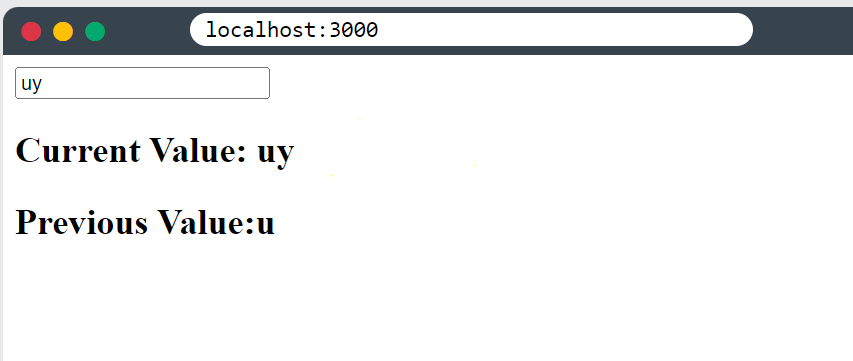
Example to demonstrate:
import { useState, useEffect, useRef } from "react";
import ReactDOM from "react-dom/client";

function App() {
  const [inputValue, setInputValue] = useState("");
  const previousInputValue = useRef("");

  useEffect(() => {
    previousInputValue.current = inputValue;
  }, [inputValue]);

  return (
    <>
      <input
        type="text"
        value={inputValue}
        onChange={(e) => setInputValue(e.target.value)}
      />
      <h2>Current Value: {inputValue}</h2>
      <h2>Previous Value: {previousInputValue.current}</h2>
    </>
  );
}

const root = ReactDOM.createRoot(document.getElementById('root'));
root.render(<App />);

/*
Start typing in the input field and you will
see the current- and previous value.
*/
-
Alternative of innerHTML in react
https://stackoverflow.com/questions/19266197/reactjs-convert-html-string-to-jsx
import ReactHtmlParser from 'react-html-parser' <div>{ReactHtmlParser(htmlString)}</div> -
Preventing propagation of event from parent to child
https://www.antimath.info/jquery/prevent-inner-elements-trigger-an-event-on-the-parent/
$('#parent a').on('click', function(event){ //stop the event bubbling up to the parent event.stopPropagation(); }); $('#parent').on('click', function(event){ //attach event on the parent alert('Parent element clicked!'); }); -
Disabling eslint for specific piece of code
searchednotes.push(note); } setIsSearching(true); setSearchedNotes(searchednotes); }, [searchValue]); // eslint-disable-line react-hooks/exhaustive-deps -
React helmet
-
Creating and export/import text file in react
const download=()=>{
	fetch(`${HOST}`,{

	})
	.then(res=>res.blob())
	.then(blob=>{
		const url = URL.createObjectURL(blob);
      const link = document.createElement("a");
      link.download = "extraordinary12.mp3";
      link.href = url;
      link.click();
	})
	.catch(console.log)
}
https://spin.atomicobject.com/2022/03/09/create-export-react-frontend/
https://spin.atomicobject.com/2022/03/09/create-export-react-frontend/
https://www.geeksforgeeks.org/how-to-read-a-local-text-file-using-javascript/
<!DOCTYPE html> <html> <head> <title>Read Text File</title> </head> <body> <input type="file" name="inputfile" id="inputfile"> <br> <pre id="output"></pre> <script type="text/javascript"> document.getElementById('inputfile') .addEventListener('change', function() { var fr=new FileReader(); fr.onload=function(){ document.getElementById('output') .textContent=fr.result; } fr.readAsText(this.files[0]); }) </script> </body> </html> -
image to dataURI
-
Nodejs 17+ changes
We need to add this in scripts section in package.json file:
"start": "react-scripts --openssl-legacy-provider start",
"build": "react-scripts --openssl-legacy-provider build",
the
--openssl-legacy-providerflag is added as extra -
JoTai global state
Instead of using useState and passing it in prop repeatedly, we can use it globally by calling the state from a file.
atom.js
import { atom } from 'jotai'

export const countAtom = atom(0)
App.js
import { useAtom } from 'jotai'
import {countAtom} from './atom'

function Counter() {
  const [count, setCount] = useAtom(countAtom)
  return (
    <h1>
      {count}
      <button onClick={() => setCount((c) => c + 1)}>one up</button>
      ...