
6.7 KiB
Set 1
-
Internet of Things The Internet of Things (IoT) describes the network of physical objects—“things”—that are embedded with sensors, software, and other technologies for the purpose of connecting and exchanging data with other devices and systems over the internet. Like smartwathes, sensors in machines, etc
-
Domain names gmail.com is domain name. org, .com are domain name extension or top level domain
-
http vs tcp TCP is the raw data transfer protocol, and http is the encoding sort of TCP manages the data stream, whereas HTTP describes what the data in the stream contains. So HTTP runs on top on TCP also IP indicates, among other information, which IP address a packet should go to (think of a mailing address), while TCP indicates which port a packet should go to at each IP address (think of the floor of a building or an apartment number).so ip address is IP and its port part is tcp.
-
Linux kernel https://www.youtube.com/watch?v=mycVSMyShk8
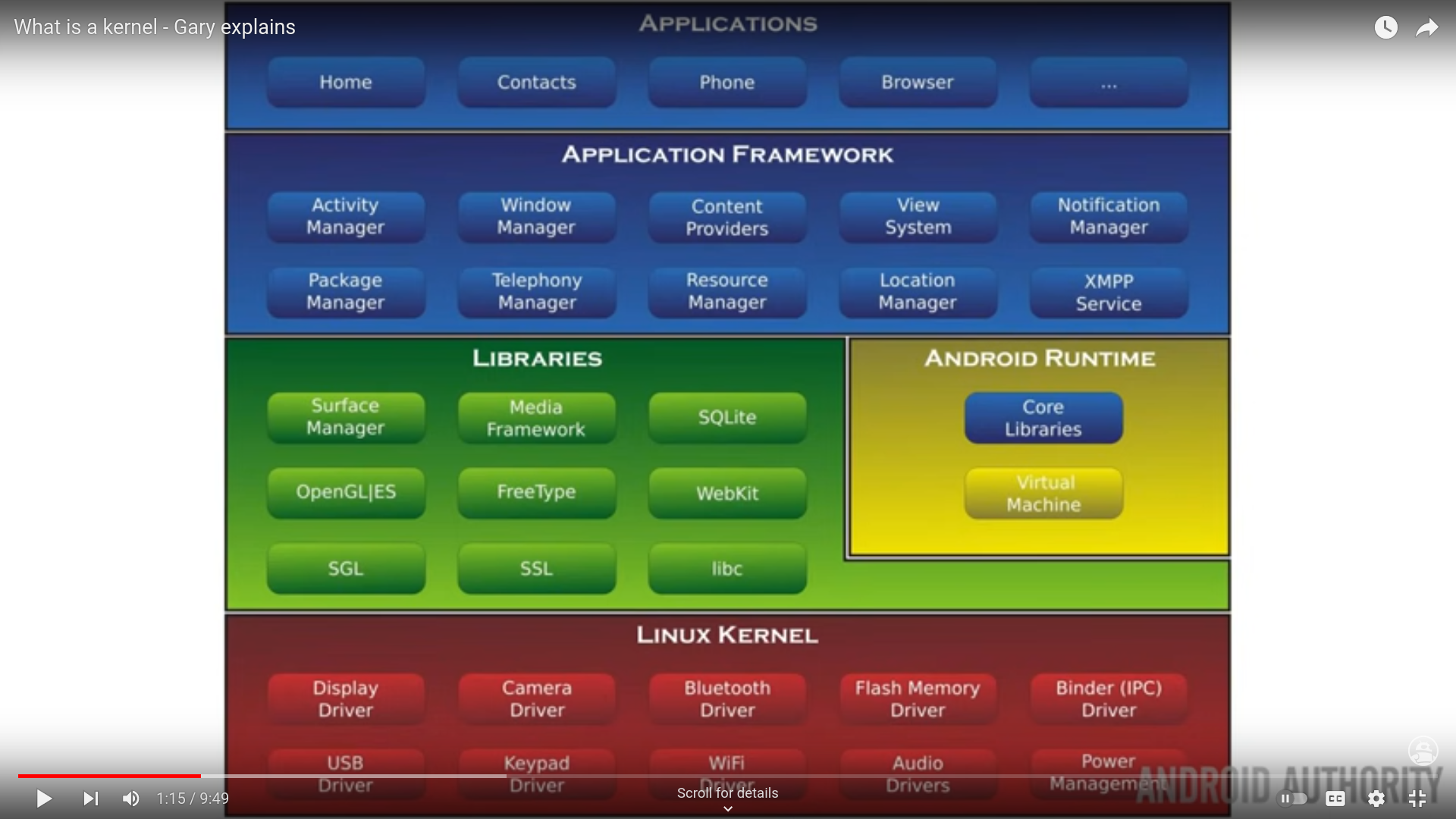
-
IPv4 address https://www.digitalocean.com/community/tutorials/understanding-ip-addresses-subnets-and-cidr-notation-for-networking It is 32 bit address contains 4 octlets as each section os if 8 bits/1 byte. from 0.0.0.0 to 255.255.255.255 . so total nodes are 2^32 eg
192.168.0.5 -
IPv6 address It is 128 bit address that contains 8 segments of 4 hex digits
1203:8fe0:fe80:b897:8990:8a7c:99bf:323dCompact version is allowed too means we can remove leading zeroes (0s from left)8703:0087:0874:0000:76b1....it can be written as8703:87:874::76b1....Compacting rule is that it can be decompressed back too. So this leading we r removing whole segment bcz of0000to::then this can be done only one time bcz1203:8fe0:0000:b897:8990:0000:0000:323dIf delete whole segment 2 times then1203:8fe0::b897:8990::323dnow in when decompressing it we dont know which side have how many segments. it can be either1203:8fe0:0000:b897:8990:0000:0000:323d(correct one)1203:8fe0:0000:0000:b897:8990:0000:323d(wrong one)- 2 types of ipv6 address in router
https://www.quora.com/Why-do-I-have-2-different-IPv6-addresses-in-my-device
starting with
fe80whch ends with scope link is for local connection only and never go outside the subnet and other one dont start withfe80and send with scope global can be used for all the actual client communications you would expect to see out across the internet etc.
- 2 types of ipv6 address in router
https://www.quora.com/Why-do-I-have-2-different-IPv6-addresses-in-my-device
starting with
-
IPv4 Classes
- Class A : 0.0.0.0 to 127.255.255.255 for large networks like ISPs
- Class B : 128.0. 0.0 to 191.255. 255.255 for medium networks like enterprise networks
- Class C : 192.0.1.1 - 223.255.254.254 for small networks ie LAN
- Class D : 224.0.0.0 - 239.255.255.255 for multicast addressing
- Class E : 240.0.0.0 - 255.255.255.254 for experimental purposes
-
Reserved IP address localhost ie loopback range is useful reserved address specified from
127.0.0.0to127.255.255.255Each class have their own reserved private address- Class A : 10.0.0.0 to 10.255.255.255
- Class B : 172.16.0.0 to 172.31.255.255
- Class C : 192.168.0.0 to 192.168.255.255 Their advantage is that if there is no internet then computer can use these private IPv4 address
-
Netmasks and Subnets Netmask is also called subnet mask The process of dividing a network into smaller network sections is called subnetting Each address space is divided into network and host potion. In class C ip
192.168.0.15first 3 octlets like192.168.0is network and15is the host Subnetting is the process of dividing a single network into smaller subnetworks, each with its own network address and range of usable internet protocol (IP) addresses. Subnet mask is specification/config which contain how many bits are allocated to network portion. In case of home wifi router subnet is 24 means 3 octelts192.168.0and last one ie15is host one Subnet /24 means 3 oclets of network portion so it can be represented as255.255.255.00 represents host section and (255) with base 10/11111111 with base 2 represents network section- Calculating network portion and host portion with subnet
Using Bitwise AND.
In
255.255.255.0the first 24 bits are 1 and others r 0 so when operated with192.168.0.15then first 3 octlets will be come as of network portion and rest host portion bcz 1.1=1 1.0=0 1.X=X 0.X=0 0 and 255 host are reserved so they cant be used so that leave us with 254 hosts.
Note : Wifi router can connect upto 250 devices so a single IP will connect to 250 devices. Other than 0 and 255 4 more r reserved bcz of mesh network maybe for wifi router subnet mask for ipv6 address in wifi router is /64 means first half of network section, rest for host section
- Subnetting
If we have subnet mask
255.255.255.0and if we wanna divide our host portion into 2 parts then use the first bit for that thus dividing them into 128 and 128. From1111 1111 1111 0000-0000To1111-1111 1111-1111 1111-1111 1000-0000So The ipv4 address is192.168.0.128used a divider. Now we have 2 subnetworks. First subnetworks from192.168.0.1to192.168.0.127Second subnetworks from192.168.0.129to192.168.0.255This happened after using 1 bit of host portion. If used more bits then more subnetting is possible.
- Calculating network portion and host portion with subnet
Using Bitwise AND.
In
-
CIDR Notation A system called 'Classless Inter-Domain Routing' or CIDR is alternative to traditional subnetting Instead of using traditional subnetting which has a fixed netmask like in router it is
255.255.255.0we can have our own specification of allocation of network and host section of ip address. We can use this192.168.0.15/24(CIDR notation) which means ip address is192.168.0.15and 24 bits for network and rest 8 for host. We can change this to192.168.0.15/23. Now we can have ineresting IP addresses like range from192.168.0.0to192.168.0.255and192.168.1.0to192.168.1.255so total of 512 hosts -
Nginx, traefik, istio, linkerd, consul etc are called ingresses and service meshes
-
how vpn transports http traffic
- Your browser sends HTTP traffic (which uses TCP).
- The VPN software wraps (encapsulates) that TCP packet.
- The encapsulated packet is sent to the VPN server using UDP.
- The VPN server unwraps it and forwards the original HTTP request to the website.
- The response comes back the same way.
http codes