
4.8 KiB
Theory
1_WHAT IS STORAGE VIRTUALIZATION?
Storage virtualization is the pooling of physical storage from multiple storage devices into what appears to be a single storage device -- or pool of available storage capacity. A central console manages the storage.
2_WHAT REALLY IS STORAGE VIRTUALIZATION?
storage virtualization is when you take multiple physical storage devices and combine them to make one, or multiple "virtual" storage devices with the storage capacity to meet your needs
3_WHAT DOES STORAGE VIRTUALIZATION DO?
so lets say you work IT at a hospital, and you got 500 different computers each with 1TB of hard drive space each, and they are all connected, controlled, and managed by an internal hospital IT network, and your the IT network guy.
now, all those hard drives are being used, each employee with a computer has their operating system installed, and their own personal work files, which means that each hard drive is going to have a different amount of space left on the hard drive, some might have 900GB of data left, some 500GB, some 200GB, but each and everyone one has a different amount of storage space.
now lets say, you as the network IT guy, wanted to create a storage space, out of 1GB, of all the hard drives you have access to, so you wanted to go into each employees computer, and borrow 1GB from each computer, and create a storage space out of all those 1GB's, you borrowed, totalling a drive of 500GB,
with storage virtualization you can do exactly that, you can take separate physical storage devices, you can take all of the storage space they have or only a part, and create a virtual storage device
Transpiling It is often called 'transpiling', when you translate code with JS-preprocessors like CoffeeScript, TypeScript (you name it) to plain JavaScript. Whereas compiling and interpreter converts code into machine language
CI/CD
- pull code from git repo, build it and deploy it, these are done by scripts
Kernal,GNU
- Think of GNU as a set of tools, kind of like Microsoft Office is a set of programs. The design of the Linux filesystem (treating everything as a file or directory) is a choice made for the Kernel, and programs that want to have any chance of running need to adhere to the Kernel
- filesystem : So we have a storage device, this could be a HDD or SDD that a computer can write data to.
Ontop of that we have firmware that sits on said physical device, this is rarely updated as it's very simple and straightforward
Above this we have the driver for the computer. This provides a standardized manner in which the operating system can read and write to the storage device.
The OS uses partitions to segment out where data can go. The format of data ontop of a partition varies, being something like NTFS, FAT32, ext4, btrfs, APFS, ZFS etc.
The "filesystem" can refer to one of two things:
- The actual formatting of how the OS reads the partition for data. ext4 and btrfs work by using something called
inodesthat define basic metadata about a file and the start and end of it's payload... So if you lose the inode you basically lose the file - General interfacing with a formatted partition e.g. interfacing with the filesystem
- metadata is a common term for data providing information about one or more other pieces of data, when inode is a type of metadata that stores basic information about a regular file, directory, or other file system object.
- The kernel is kind of like the nervous system of a human, it does a lot of control and operation of the low-level functionality. The two common Kernel interfaces are as a filesystem (How linux and unix work) of via APIs (Windows 🤢) Any command you enter on a PTY first asks the kernel to start a new task (process) with some given parameters. It locates the executable and creates a new process passing the parameters that were provided. It bill bind an input and output stream (stdin/stderr/stdout) etc and let the program access sockets and whatever else based on permissions defined for the executor of the program and the program itself
- "space" refers to the execution of a program.
If something runs in "kernel" space that means it's running under the operating system. If it runs in "user" space that means it runs for a particular user"
Think of it like this: Nano runs for user
robinand xorg runs for userrootThe init system controls the root process, and whichuserowns it. I'm not really an expert on this so take my explanation with a grain of salt per a stackoverflow thread, a program run by the root user runs in user mode and switches to kernel mode when needed and then back to user mode (it goes back and forth) source : https://stackoverflow.com/questions/2354125/difference-between-processes-running-in-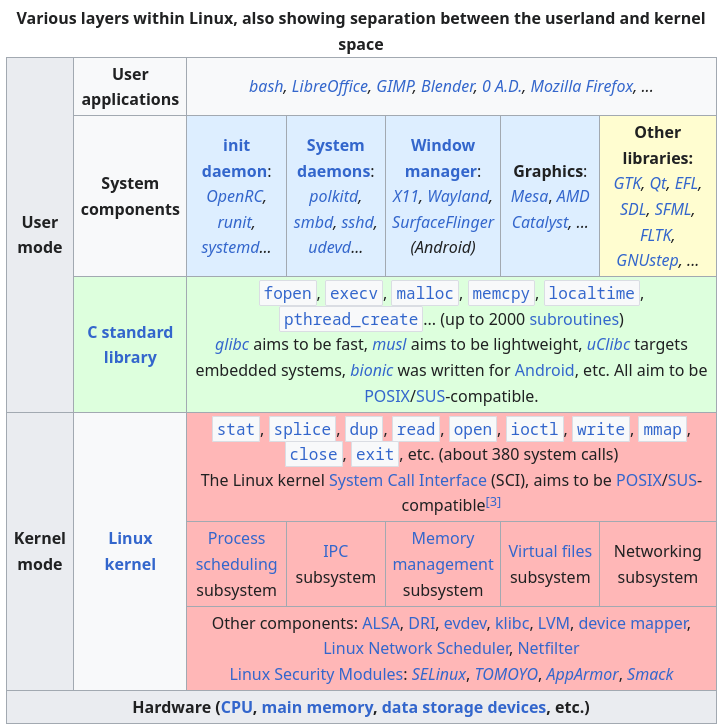
- The actual formatting of how the OS reads the partition for data. ext4 and btrfs work by using something called