
7.8 KiB
Docker
- Docker is both the company and platform
- An open source container runtime
- Cross platform desktop support
- Command line tool
- "Dockerfile" file format for building container images
- Windows let us create both windows and linux containers Docker cli commands
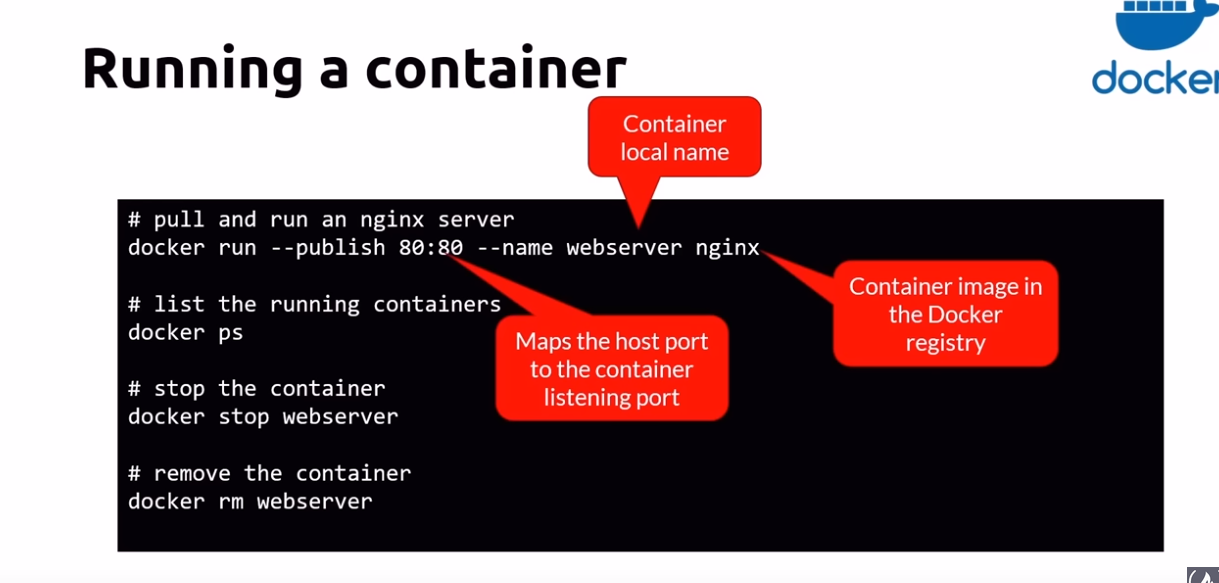
docker info: display system informationdocker versiondocker login: by default it will login to dockerhub Docker running commandsdocker run [imageName]: execute image in memory. image is not present in cache, it will be downloaded automatically. there is another flag named--nameto give name to docker instance which will run. if we dont provide docker will generate random name. eg :docker run --name web [imageName]here web is the name imposing limits on docker instancedocker run --memory="256m" nginxdocker run --cpus=".5" nginxdocker run -d [imageName]: to run container in background so u can still use the terminaldocker stop [containerName]: will stop the execution but it will still in memorydocker kill [containerName]: to remove container in memory which r stuckdocker image inspect: useful for debugging- Note: When we use run we create a container from the image. Also when we use flags with
runcertain configuration are set too To stop execution we can use stop command but using start we can again start it with same configuration too.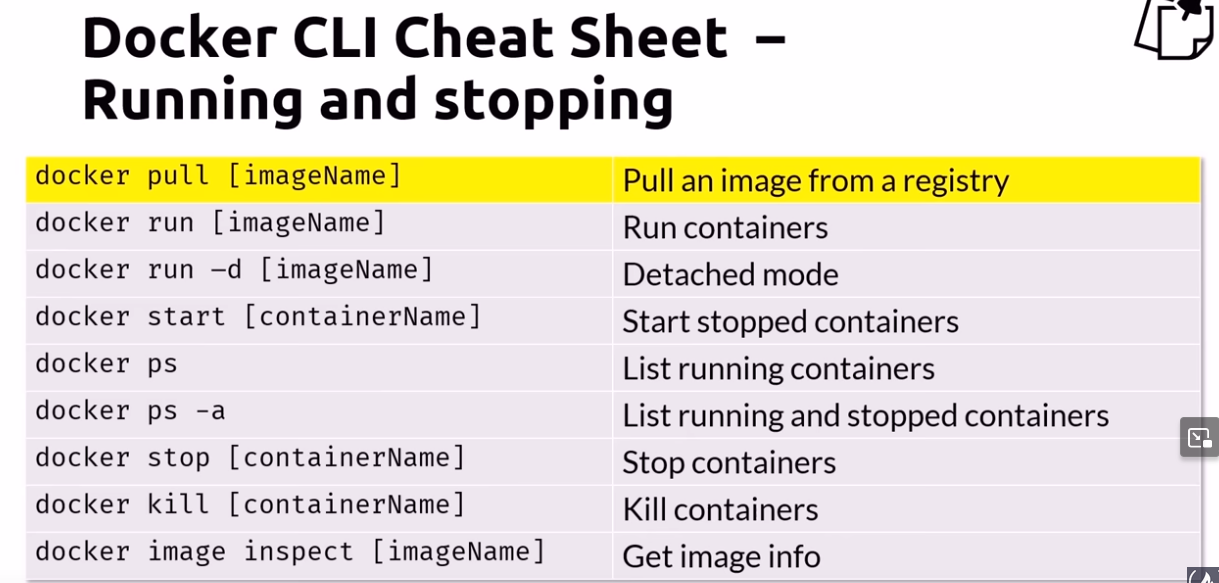
Usage
 Attach shells
 Working command
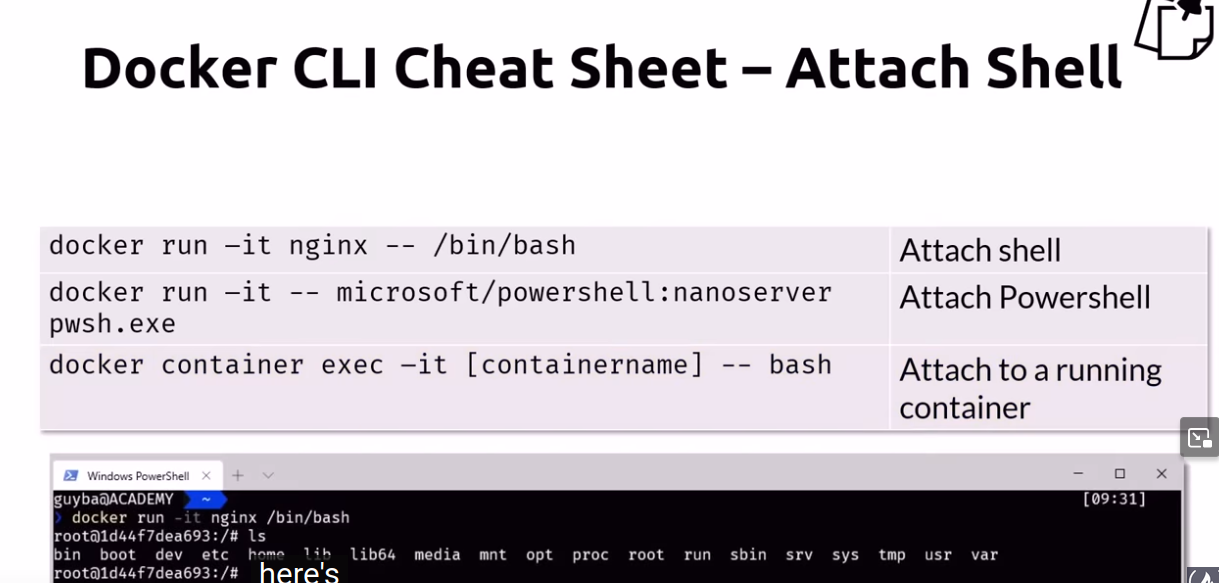
docker exec -it web3 bash
here web3 is container name which is running in background
for executing commands for background running containers
podman exec web3 bash -c "ls"
for non running containers
docker run -it --name archc8 archlinux:latest /usr/bin/bash
for non running containers so basically creating a new container
docker run -it alpine:latest sh -c "apk add --update bash && exec bash"
By using the --rm flag with either the docker run or docker create command, you ensure that the container is automatically removed once it stops
to start distro and keep it running
podman run -itd --name ubuntu1 ubuntu /bin/bash
Clearing things up
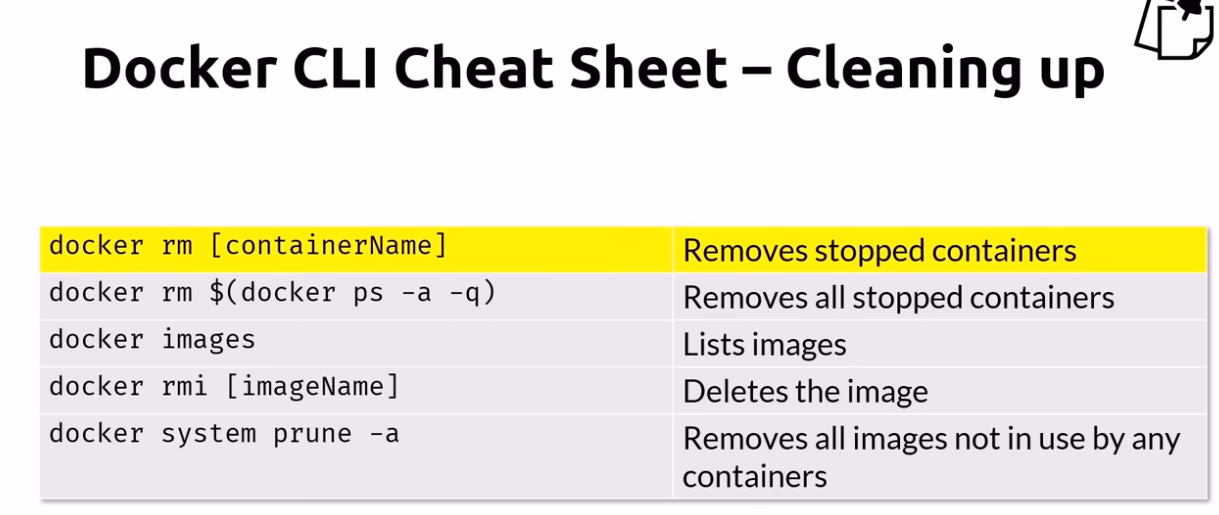 For removing containers, they must be stopped first
Docker build containers
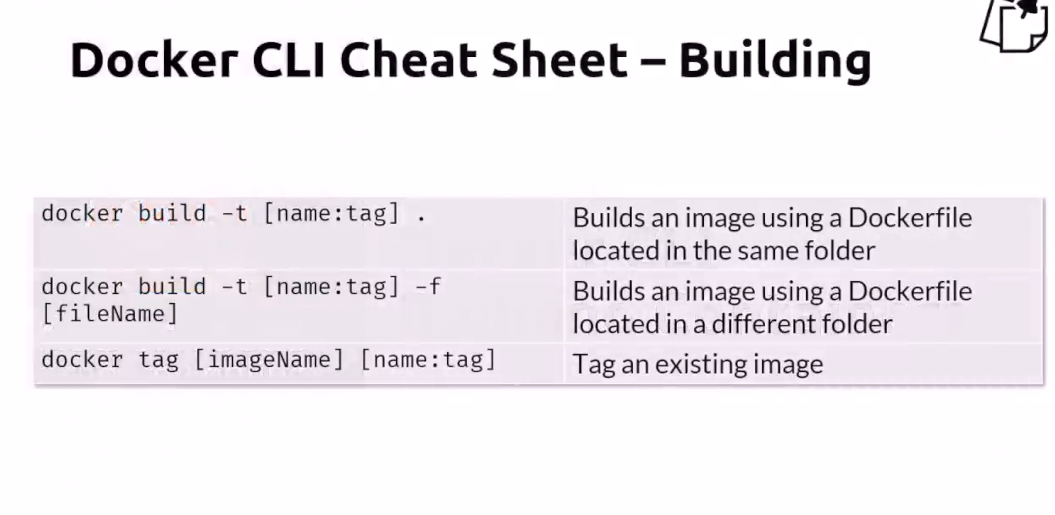
docker build -t ngthml:1.0 dockers/(dockers folder contain Dockerfile)- If Dockerfile name is not DockerFile then specify that name with
-fflag. - Eg of dockerfile
FROM command specify base image and when we build something we use image which already exist. nginx:alpine is very lightweight then copy whole folder containing Dockerfile toFROM nginx:alpine COPY . /usr/share/nginx/html/usr/share/nginx/htmlof alpine - Nodejs Dockerfile
alpine is very lightweight and there isnt even bash installed so we cant have interactive shell too. But we can install bash by
docker exec -it node_hello apk add --update bashor including it inRUN apk add --update nodejs npm bashFROM alpine RUN apk add --update nodejs npm COPY . /src WORKDIR /src RUN npm install EXPOSE 8080 ENTRYPOINT ["node", "./app.js"]- RUN apk .... : Using RUN we can execute commands when generating container. in this case using apk package manager of alpine we are installing nodejs and npm.
Then we copy current folder to
/srcand making it as work directory too. WORKDIRis a combination or cd and mkdir as we dont need to make directory too as workdir will handle it.RUN cdwont have effect as when using RUN commands will be run in different shell so thats why using WORKDIR is preferred WORKDIR / changes the working directory for future commands. RUN cd / has no impact on the subsequent RUNs.- EXPOSE will make sure which port shoould be accessible by other containers or host system
- ENTRYPOINT means commands that will run when the container start
Difference between run,cmd and entrypoint
https://www.bmc.com/blogs/docker-cmd-vs-entrypoint/
https://www.cloudbees.com/blog/understanding-dockers-cmd-and-entrypoint-instructions
- RUN. Mainly used to build images and install applications and packages, RUN builds a new layer over an existing image by committing the results.
- CMD. Sets default parameters that can be overridden from the Docker Command Line Interface (CLI) when a container is running. eg :
cmd node app.js - ENTRYPOINT. Default parameters that cannot be overridden when Docker Containers run with CLI parameters.
Example
if there is
cmd node app.jsanddocker run nodecontainer node app2.jsthen in docker container it will benode app2.jsas it will override if there isentrypoint ["node", "app.js"]anddocker run nodecontainer node app2.jsthen in docker container it will be
instead of overridingnode app.js node app2.jsnode app2.jsis appended
- RUN apk .... : Using RUN we can execute commands when generating container. in this case using apk package manager of alpine we are installing nodejs and npm.
Then we copy current folder to
- docker tag
-
Assign a name and tag to a specific image ID:
docker tag id name:tag -
Assign a tag to a specific image:
docker tag image:current_tag image:new_tag
-
- docker cp
to copy files from docker container to host
docker cp <containerId>:/file/path/within/container /host/path/targeteg:docker cp node_hello_sh:/ alpine_node/to copy files from host to docker containerdocker cp /host/path/target container_id:/file/path/within/containereg:docker cp foo.txt container_id:/foo.txt - docker logs
docker logs <container_id>or when creating containerdocker run --log-level=debug ... - Expose port of already created container
While it is not possible to expose port we can access it by
http://container_ip:PORT. we can find container ip bydocker inspect container_name | grep IPAddress. rundocker psto find container name first - environment variables when starting a container from image
docker run --name my-tomcat -p 127.0.0.1:8080:8080 -e APP_DB_DB=mydb -e APP_DB_USER=dbuser -e APP_DB_PASS=dbpass --link mongo-myapp:mongo -v /path-to/tomcat/webapps:/usr/local/tomcat/webapps -d tomcat:8-jre8-alpine - creating image from container
after making some changes in container we can create its own image too
docker commit nginx_basewhere nginx_base is name of container this will create image but it have no tag so crating its tag withdocker tag 0c17f0798823 hello_world_nginxor simply add tag when creating imagedocker commit nginx_base hello_world_nginxhere hello_world_nginx is name of image - docker volume
docker run -v $PWD:/data -it archivebox/archivebox init --setup-v $PWD:/data: This mounts the current working directory (represented by $PWD, which is a shell variable) on your host machine to the /data directory inside the Docker container. This is crucial because it allows ArchiveBox to store its data (archived websites, indexes, etc.) persistently on your host machine, even if the container is stopped or removed. The -v flag stands for "volume." - docker import and export images
https://stackoverflow.com/questions/24482822/how-to-share-my-docker-image-without-using-the-docker-hub
Based on this blog, one could share a docker image without a docker registry by executing:
docker save --output latestversion-1.0.0.tar dockerregistry/latestversion:1.0.0Once this command has been completed, one could copy the image to a server and import it as follows:docker load --input latestversion-1.0.0.tar