8.5 KiB
8.5 KiB
Coding
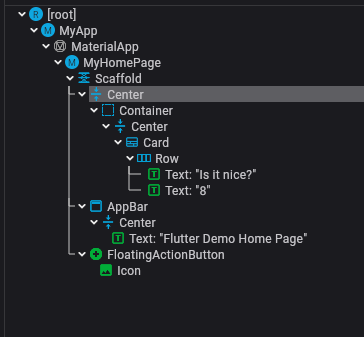
Tree of widgets
- Widgets can be specified as
Widgetname(fieldname : text or Widgetname(...))
 @override
  Widget build(BuildContext context) {
    // This method is rerun every time setState is called, for instance as done
    // by the _incrementCounter method above.
    //
    // The Flutter framework has been optimized to make rerunning build methods
    // fast, so that you can just rebuild anything that needs updating rather
    // than having to individually change instances of widgets.
    return Scaffold(
      appBar: AppBar(
        // TRY THIS: Try changing the color here to a specific color (to
        // Colors.amber, perhaps?) and trigger a hot reload to see the AppBar
        // change color while the other colors stay the same.
        backgroundColor: Theme.of(context).colorScheme.inversePrimary,
        // Here we take the value from the MyHomePage object that was created by
        // the App.build method, and use it to set our appbar title.
        title: Text(widget.title),
      ),
      body: Center(
        // Center is a layout widget. It takes a single child and positions it
        // in the middle of the parent.
        child: Column(
          // Column is also a layout widget. It takes a list of children and
          // arranges them vertically. By default, it sizes itself to fit its
          // children horizontally, and tries to be as tall as its parent.
          //
          // Column has various properties to control how it sizes itself and
          // how it positions its children. Here we use mainAxisAlignment to
          // center the children vertically; the main axis here is the vertical
          // axis because Columns are vertical (the cross axis would be
          // horizontal).
          //
          // TRY THIS: Invoke "debug painting" (choose the "Toggle Debug Paint"
          // action in the IDE, or press "p" in the console), to see the
          // wireframe for each widget.
          mainAxisAlignment: MainAxisAlignment.center,
          children: <Widget>[
            const Text(
              'You have pushed this button this many times',
            ),
            Text(
              '$_counter',
              style: Theme.of(context).textTheme.headlineMedium,
            ),
          ],
        ),
      ),
      floatingActionButton: FloatingActionButton(
        onPressed: _incrementCounter,
        tooltip: 'Increment',
        child: const Icon(Icons.add),
      ), // This trailing comma makes auto-formatting nicer for build methods.
    );
  }
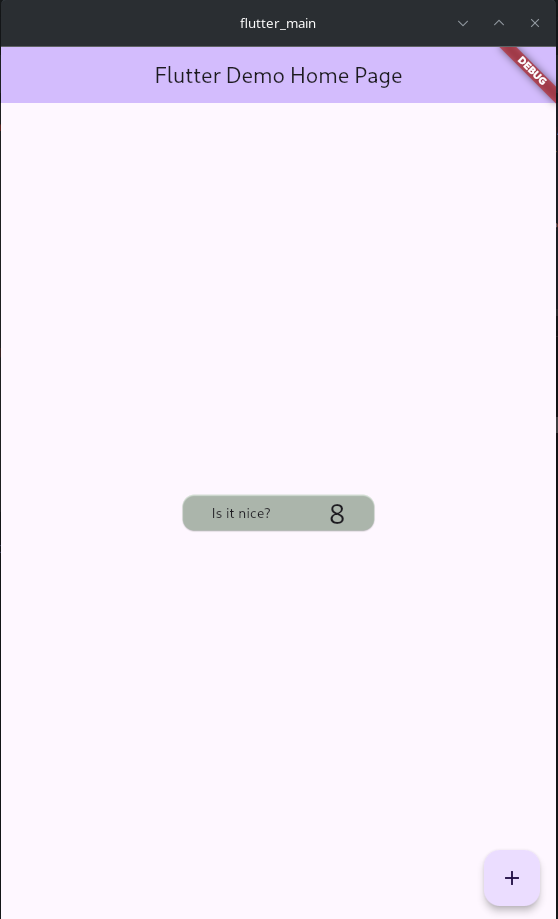
example to show some features and widgets
import 'package:flutter/material.dart';

void main() {
 // runApp(const MyApp());
 runApp(const MyApp());
}

class MyApp extends StatelessWidget {
 const MyApp({super.key});

 // This widget is the root of your application.
 @override
 Widget build(BuildContext context) {
   return MaterialApp(
     title: 'Flutter Demo',
     theme: ThemeData(
       // This is the theme of your application.
       //
       // TRY THIS: Try running your application with "flutter run". You'll see
       // the application has a purple toolbar. Then, without quitting the app,
       // try changing the seedColor in the colorScheme below to Colors.green
       // and then invoke "hot reload" (save your changes or press the "hot
       // reload" button in a Flutter-supported IDE, or press "r" if you used
       // the command line to start the app).
       //
       // Notice that the counter didn't reset back to zero; the application
       // state is not lost during the reload. To reset the state, use hot
       // restart instead.
       //
       // This works for code too, not just values: Most code changes can be
       // tested with just a hot reload.
       colorScheme: ColorScheme.fromSeed(seedColor: Colors.deepPurple),
       useMaterial3: true,
     ),
     home: const MyHomePage(title: 'Flutter Demo Home Page'),
   );
 }
}

class MyHomePage extends StatefulWidget {
 const MyHomePage({super.key, required this.title});

 // This widget is the home page of your application. It is stateful, meaning
 // that it has a State object (defined below) that contains fields that affect
 // how it looks.

 // This class is the configuration for the state. It holds the values (in this
 // case the title) provided by the parent (in this case the App widget) and
 // used by the build method of the State. Fields in a Widget subclass are
 // always marked "final".

 final String title;

 @override
 State<MyHomePage> createState() => _MyHomePageState();
}

class _MyHomePageState extends State<MyHomePage> {
 int _counter = 0;

 void _incrementCounter() {
   setState(() {
     // This call to setState tells the Flutter framework that something has
     // changed in this State, which causes it to rerun the build method below
     // so that the display can reflect the updated values. If we changed
     // _counter without calling setState(), then the build method would not be
     // called again, and so nothing would appear to happen.
     _counter++;
   });
 }

 @override
 Widget build(BuildContext context) {
   // This method is rerun every time setState is called, for instance as done
   // by the _incrementCounter method above.
   //
   // The Flutter framework has been optimized to make rerunning build methods
   // fast, so that you can just rebuild anything that needs updating rather
   // than having to individually change instances of widgets.
   return Scaffold(
     appBar: AppBar(
         // TRY THIS: Try changing the color here to a specific color (to
         // Colors.amber, perhaps?) and trigger a hot reload to see the AppBar
         // change color while the other colors stay the same.
         backgroundColor: Theme.of(context).colorScheme.inversePrimary,
         // Here we take the value from the MyHomePage object that was created by
         // the App.build method, and use it to set our appbar title.
         title: Center(
           child: Text(widget.title),
         )),
     body: Center(
         child: Container(
             // constraints: const BoxConstraints(
             //   maxWidth: 200,
             //   maxHeight: 300,
             // ),
             // mainAxisSize: ,
             width: 200,
             // alignment:
             // width: EdgeInsets.only(left: 114),
             child: Center(
                 // widthFactor: 100.0,
                 child: Card(
               // Center is a layout widget. It takes a single child and positions it
               // in the middle of the parent.
               color: const Color.fromRGBO(30, 190, 30, 0.1),
               // color : 'green',
               // margin: EdgeInsets.all(114.0),
               child: Row(
                 // Column is also a layout widget. It takes a list of children and
                 // arranges them vertically. By default, it sizes itself to fit its
                 // children horizontally, and tries to be as tall as its parent.
                 //
                 // Column has various properties to control how it sizes itself and
                 // how it positions its children. Here we use mainAxisAlignment to
                 // center the children vertically; the main axis here is the vertical
                 // axis because Columns are vertical (the cross axis would be
                 // horizontal).
                 //
                 // TRY THIS: Invoke "debug painting" (choose the "Toggle Debug Paint"
                 // action in the IDE, or press "p" in the console), to see the
                 // wireframe for each widget.
                 // mainAxisAlignment: MainAxisAlignment.center,
                 mainAxisAlignment: MainAxisAlignment.spaceAround,
                 children: <Widget>[
                   const Text(
                     'Is it nice?',
                   ),
                   Text(
                     '$_counter',
                     style: Theme.of(context).textTheme.headlineMedium,
                   ),
                 ],
               ),
             )))),
     floatingActionButton: FloatingActionButton(
       onPressed: _incrementCounter,
       tooltip: 'Increment',
       child: const Icon(Icons.add),
     ), // This trailing comma makes auto-formatting nicer for build methods.
   );
 }
}