
10 KiB
Coding 2 (Web app with Spring boot)
- Advantage of spring boot is embeded tomcat means we dont have to download tomcat externally so its easy to deploy it too.
- Create
HomeController.javain com.example.demo
package com.example.demo;

import org.springframework.stereotype.Controller;
import org.springframework.web.bind.annotation.RequestMapping;
import org.springframework.web.bind.annotation.ResponseBody;
import org.springframework.web.bind.annotation.RestController;

@Controller
public class HomeController {

    @RequestMapping("home")
    @ResponseBody
    public String home(){
        System.out.println("hi");
        return "hi";
    }
}
ResponseBody annotation means some data is being returned instead of some file. above can be replaced by simply using RestController annotation instead of Controller and we dont need to include ResponseBody
package com.example.demo;

import org.springframework.stereotype.Controller;
import org.springframework.web.bind.annotation.RequestMapping;
import org.springframework.web.bind.annotation.RestController;

@RestController
public class HomeController {

    @RequestMapping("home")
    public String home(){
        System.out.println("hi");
        return "hi";
    }
}
- To return a file say html file or image file put them at
src/main/resources/staticfolder and return filename
package com.example.demo;

import org.springframework.stereotype.Controller;
import org.springframework.web.bind.annotation.RequestMapping;

@Controller
public class HomeController {

    @RequestMapping("home")
    public String home(){
        System.out.println("home");
        return "home.html";
    }

    @RequestMapping("image")
    public String image(){
        System.out.println("image");
        return "image.png";
    }

}
Application properties files
- Spring boot has auto configure thing which does configuration for us but we can modify it too by editing the file
application.propertiesatsrc/main/resources - In
staticfolder if we want to group them in some other folder like pages then we have to do this inapplication.properties
We can have includespring.application.name=demo spring.mvc.view.prefix=/pages/spring.mvc.view.suffix=.jsptoo but this is for jsp only and not for simple html - above will make changes globally for all routes so instead of using prefix we can simply do this when returning file
return "pages/home.html";
Accepting client data
https://docs.spring.io/spring-framework/reference/web/webmvc/mvc-controller/ann-requestmapping.html
- for returning files : https://www.geeksforgeeks.org/returning-an-image-or-a-file-with-spring/
- In the below code there are 3 different examples for handling/parsing query strings and returning json or string
- handling request and response servlet way : using write method of res and getParameter of req
- handling response and request spring way
: using
ResponseEntity<T>andRequestEntity<T> - handling query parameter spring way : using
RequestParamannotation - catching custom parameters : enclosing variable in curly braces in RequestMapping annotation and capturing it with PathVariable annotation
- returning back files : using Path and UrlResource classes
package com.example.demo;

import java.io.IOException;
import java.io.PrintWriter;
import java.net.URI;
import java.nio.file.Path;
import java.nio.file.Paths;

import org.springframework.core.io.Resource;
import org.springframework.core.io.UrlResource;
import org.springframework.http.MediaType;
import org.springframework.http.RequestEntity;
import org.springframework.http.ResponseEntity;
import org.springframework.stereotype.Controller;
import org.springframework.web.bind.annotation.PathVariable;
import org.springframework.web.bind.annotation.RequestMapping;
import org.springframework.web.bind.annotation.RequestParam;
import org.springframework.web.bind.annotation.ResponseBody;
import org.springframework.web.bind.annotation.RestController;

import jakarta.servlet.http.HttpServletRequest;
import jakarta.servlet.http.HttpServletResponse;

@Controller
public class HomeController {

    @RequestMapping("home")
    // @ResponseBody
    public void home(HttpServletRequest req, HttpServletResponse res) throws IOException{

       // handling request and response servlet way

        // localhost:8080/home?name=<name>
        String name = req.getParameter("name");

        // String json = "{\"name\" : \"homepage\"}";
        String json = String.format("{\"name\" : \"%s\"}", name);

        System.out.println("home "+name);

        res.setContentType("application/json");

        PrintWriter out= res.getWriter();
        out.write(json);
        out.flush();


        // return "pages/home.html";
        // return "{\"name\" : \"homepage\"}";
    }

    @RequestMapping("image")
    public String image(){
        System.out.println("image");
        return "image.png";
    }

    @RequestMapping("json-data")
    public ResponseEntity<String> getJSON( RequestEntity<String> req) throws IOException{
        // handling response and request spring way

        URI url = req.getUrl();


        // to get query string params like name=<name>&id=<id>
        String queryString=url.getQuery();


        // String json = "{\"name\" : \"homepage\"}";
        String json = String.format("{\"queryString\" : \"%s\"}", queryString);

        System.out.println("home "+queryString);

        return ResponseEntity.ok().contentType(MediaType.APPLICATION_JSON).body(json);

    }

    // handling query parameter spring way
    @RequestMapping("query-param")
    @ResponseBody
    public String getQueryParam( @RequestParam("name") String name, @RequestParam("id") String id){
        System.out.println("name: "+name);
        return "name="+name+" id="+id;
    }

    @RequestMapping("{itemid}")
    @ResponseBody
    public String getItemID(@PathVariable String itemid){
        System.out.println("itemid="+itemid);
        return itemid;
    }

    @RequestMapping("file")
    public ResponseEntity<Resource> getFile() throws IOException{
        Path path = Paths.get("src/main/resources/static/image.png");

        // Loading resource
        Resource resource =(Resource) new UrlResource(path.toUri());

        return ResponseEntity.ok().contentType(MediaType.IMAGE_PNG).body(resource);
    }

}
Model and View
-
ModelAndView is Holder for both Model and View in the web MVC framework
-
For understanding thymeleaf refer to this https://www.baeldung.com/thymeleaf-in-spring-mvc https://www.baeldung.com/java-thymeleaf-expression-types
-
Make sure thymeleaf is installed first. Add this dependency under dependencies section in
pom.xml<dependency> <groupId>org.springframework.boot</groupId> <artifactId>spring-boot-starter-thymeleaf</artifactId> </dependency> -
in thymeleaf to be some special tag attributes like
th:text(for simple text) ,th:utext(for nested HTML ) inHomeController.java@RequestMapping("model-view") public ModelAndView modelview(@RequestParam("name") String myname){ ModelAndView mv = new ModelAndView(); mv.addObject("name", myname); // refers to thyme.html mv.setViewName("thyme"); return mv; }in
src/main/resources/templates/thyme.html<!DOCTYPE html> <html xmlns:th="http://www.thymeleaf.org"> <head> <meta charset="UTF-8"> <meta name="viewport" content="width=device-width, initial-scale=1.0"> <title>Document</title> <style> .red{ color: red; } </style> </head> <body> <h1 class="greeting" th:text="${name}"></h1> <span th:utext="'my <span class=\'red\'>name ' +${name}+ '</span> is ' + ${name}"></span> <h1 class="greeting" th:text="${name}"></h1> </body> </html>at
http://localhost:8080/model-view?name=ipsum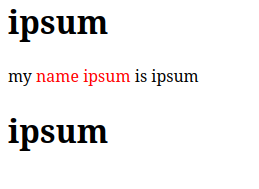
Model
- Instead of using RequestParam annotation to get query parameters we can simply create a POJO and pass pojo object as parameter in controller method. When we map it to route and when that route sends data to it then it will recieve it as object so with appropriate class object in parameter it is possible to read those query parameters.
in
Alien.java
package com.example.demo;

public class Alien {
    private int aid;
    private String aname;
    private String lang;

    public int getAid() {
        return aid;
    }

    public String getAname() {
        return aname;
    }

    public String getLang() {
        return lang;
    }

    public void setAid(int aid) {
        this.aid = aid;
    }

    public void setAname(String aname) {
        this.aname = aname;
    }

    public void setLang(String lang) {
        this.lang = lang;
    }
}
In HomeController.java
  @RequestMapping("model")
    public ModelAndView model(Alien alien)
    {

        ModelAndView mv = new ModelAndView();
        mv.addObject("obj", alien);

        mv.setViewName("thyme");

        return mv;
    }
or we can use Model class too
    @RequestMapping("model")
    public String model(Alien alien, Model model)
    {

        model.addAttribute("obj", alien);

        return "thyme";
    }
in thyme.html
<!DOCTYPE html>
<html xmlns:th="http://www.thymeleaf.org">
<head>
   <meta charset="UTF-8">
   <meta name="viewport" content="width=device-width, initial-scale=1.0">
   <title>Document</title>
   <style>
       .red{
           color: red;
       }
   </style>
</head>
<body>
   <h1 class="greeting" th:text="${obj.aname}"></h1>
   <span th:utext="'my <span class=\'red\'>name ' +${obj.aid}+ '</span> is ' + ${obj.aname}"></span>
   <h1 class="greeting" th:text="'My lang is '+${obj.lang}"></h1>
</body>
</html>
at http://localhost:8080/model?aname=telusko&aid=101&lang=java

Services
- Instead of having all logic in controllers we can create separate service beans . @Component, @Service. these annotations all control beans but for readbility we prefer Service when actually creating service