
13 KiB
13 KiB
Shell
Type mongosh in terminal to start the shell
show databases/dbs: to show databasesshow collections: to show collectionsuse test2: switch to test2 database. if test2 doesnt exist it will still switch to it. Once the collection is created in non existent database then that database will be created.- cls : to clear screen
- creating variable
var name="yoshi"then type name in shell it will returnyoshiname = "mario"then typing name in shell will returnmario - exit : to exit shell
Creating document
- First add collection using
db.createCollection('col1')this - Inserting document
db.col1.insertOne({title : "The Color of Magic", author : "Terry Pratchett"})We dont havecol2but if we try to insert document in this collection then this connection will be createddb.col2.insertOne({title : "title1"})for inserting multipledb.col1.insertMany([{title: "The light fantastic"}, {title: "title2"}])
Finding Documents
- Getting all documents
db.col1.find()this is similar toselect * from col2in sql. - Using filters in find method
db.col1.find({author : "Terry Pratchett", title : "The Color of Magic"})This will print those document with given fields values its equal toselect * from col1 where author = 'Terry Pratchett' and title = 'The Color of Magic'db.col1.find({author : "Terry Pratchett"}, {title: 1, author : 1})To specify what field we want instead of getting whole document we can specify that in 2nd parameter of find method. this is similar toselect title,author from col1 where author = 'Terry Pratchett'To get some field but with no filterdb.col1.find({}, {title: 1, author : 1})just pass empty object as 1st parameter for thatdb.col1.findOne({_id: ObjectId('66590a00d3c92df2cd286ea0')}to find one document and to pass fields which are keys basically as it will just find first document which matched property.
Sorting and Limiting Data
db.col1.find({author : "Terry Pratchett"}).count()We can chain methods like this. after getting results, count method will return the count of themdb.col1.find().limit(2)this will return the first 2 results- to get 11th to 20th results and not first 20 results use
db.col1.find().skip(10).limit(10)When you chain skip() and limit(), the method chaining order does not affect the results. The server always applies the skip operation based on the sort order before it applies the limit on how many documents to return. The following code example shows different chaining orders for skip() and limit() that always produce the same query results for the same data set:db.myColl.find().sort({_id: 1}).skip(3).limit(6); db.myColl.find().sort({_id: 1}).limit(6).skip(3); db.col1.find().sort({title: 1}).limit(2)this will sort the documents by title in ascending and return the first 2 results in order to sort by descending order usedb.col1.find().sort({title: -1}).limit(2)
Nested Documents
- Instead of creating separate collection we can add them as nested documents too to reduce the complexity too
Query
 db.books.insertOne({
   title: "The Way of Kings",
   author: "Brandon Sanderson",
   rating: 9,
   pages: 320,
   genres: ["fantasy"],
   reviews: [{
 	name: "Yoshi",
 	body: "Great book!!!"
   },
   {
 	name: "mario",
 	body: "So so"
   }
 ]
 })

 db.books.insertMany(
 	[{title: "The Light Fantastic",
 	  author: "Terry Pratchett",
 	  pages: 250,
 	  rating: 6,
 	  genres: ["fantasy", "magic"],
 	  reviews: [{name:"luigi", body: "it was pretty good"}, {name: "bowser", body: "loved it!!"}]}, {title: "The Name of the Wind", "author": "Patrick Rothfuss", page: 500, "rating": 10, genres: ["fantasy"], review: [{name: "peach", body: "one of my favs"}]},
 	 {title: "The Color of Magic",
 	  "author": "Terry Pratchett",
 	  page: 350,
 	  "rating": 8,
 	  genres: ["fantasy", "magic"],
 	  review: [{name: "luigi", body: "it was ok"}, {name: "bowser", body: "really good book"}]},
 	 {title: "1984",
 	  "author": "George Orwell",
 	  page: 300,
 	  "rating": 6,
 	  genres: ["sci-fi", "dystopian"], review: [{name: "peach", body: "not my cup of tea"}, {name: "mario", body: "meh"}]}
 	])
Operations and Complex Queries
- All operators begin with
$sign - gt : greater than
db.books.find({rating : {$gt : 8}})All books with rating greater than 8 - gte : greater than or equal to
- lt : lesser than
- lte : lesser than or equal to
- or
db.books.find({$or : [ {rating : 7}, {rating: 9} ]})this will return those books whose rating is either 7 or 9.db.books.find({ $or : [{rating : 7}, {author: "Terry Pratchett" } ] }) - last example
db.books.find( {$or : [{pages: {$lt : 300}}, {pages: {$gt: 400} } ]} )this will return books with pages less than 300 and pages greater than 400. - for accessing nested objects
 db.col1.insertOne(
  {
	"obj": {
  	"data": "lorem"
	}
  }
 )
db.col1.find( { "obj.data": "lorem" } ) - Summary
- Name
 = Description

 $eq
 Matches values that are equal to a specified value.

 $gt
 Matches values that are greater than a specified value.

 $gte
 Matches values that are greater than or equal to a specified value.

 $in
 Matches any of the values specified in an array.

 $lt
 Matches values that are less than a specified value.

 $lte
 Matches values that are less than or equal to a specified value.

 $ne
 Matches all values that are not equal to a specified value.

 $nin
 Matches none of the values specified in an array.


 Logical

 - Name
 = Description

 $and
 Joins query clauses with a logical AND returns all documents that match the conditions of both clauses.

 $not
 Inverts the effect of a query expression and returns documents that do not match the query expression.

 $nor
 Joins query clauses with a logical NOR returns all documents that fail to match both clauses.

 $or
 Joins query clauses with a logical OR returns all documents that match the conditions of either clause.
in and nin operator
- in :
db.books.find({rating : {$in : [7,8,9] }}): return results whose ratings are either of the values in array. Same can be done withordb.books.find({$or : [ {rating: 7},{rating: 8},{rating: 9} ] }) - nin :
db.books.find({rating : {$nin : [7,8,9] }}): return results whose ratings are neither of the values in array. Same can be done withnordb.books.find({$nor : [ {rating: 7},{rating: 8},{rating: 9} ] })
Querying Arrays
- Match found
db.books.find({genres: "fantasy"})this will return the documents whose field genre contains fantasy in its array. genre may be only fantasy or it can have more genres too butfantasymust be included. - Only match
As genre is array so to get the only match
db.books.find({genres: ["fantasy"]})this will return documents with field containing this value which isfantasyonly. we can have magic too so it will return those which contains valuesfantasyandmagictoo. eg 2:db.books.find({genres: ["fantasy","magic"]}) - Match found for given set(all operator)
Only match will only return those with specified but if we want to include those with given set(they can have more but given set must be included) then
db.books.find({genres: {$all: ["fantasy", "sci-fi"]} }) - Match found of either of given values
for example if we need those which contains atleast magic or atleast sci-fi in one of them
db.books.find({ $or: [ {genres: "magic"}, {genres : "sci-fi"} ] }) - Matching nested documents
review field contains documents itself. Suppose we wanna query those documents whose review have documnets with field name and we want specific name too like 'luigi'(documnets where reviews is posted by user 'luigi') then
db.books.find({"review.name": "luigi"})
Deleting Documents
db.books.deleteOne({_id : ObjectId('66592602d3c92df2cd286ea5')})this will delete one document with the given_idvalue. we can have different field too but since id is unique so it is recommended.db.books.deleteMany({author : "Terry Pratchett"})Unlike deleteOne which will delete only one document and stop its search, this will delete all the documents containing the given value of field
Updating Documents
db.books.updateOne( {_id : ObjectId('66592602d3c92df2cd286ea5') }, {$set : {rating : 8, pages : 350}} )set operator is used to change the values of fields of document whose id isObjectId('66592602d3c92df2cd286ea5').db.books.updateMany( {author : "Terry Pratchett" }, {$set : {author : "Terry Pratchet"}} )to update records of given field. unlike updateOne it will check for every records and wont stop after first match is found.- inc operator
db.books.updateOne( {_id: ObjectId('66592602d3c92df2cd286ea2')}, {$inc : {pages : 2} } )unlike set it doesnt replace but increment it so in case we dont know the value and wanna increment it then we can use this To decrement it we can pass just negative number like-2 - push and pull
to add or delete contents in array
db.books.updateOne( {_id: ObjectId('66592602d3c92df2cd286ea2')}, {$pull : {genres : "fantasy"} } )to deletefantasyfrom array of genresdb.books.updateOne( {_id: ObjectId('66592602d3c92df2cd286ea2')}, {$push : {genres : "fantasy"} } )to addfantasyin array of genres - each
with push and pull we can only do it for one element of array. for multiple elements we have to each operator
db.books.updateOne( {_id: ObjectId('66592602d3c92df2cd286ea2')}, {$push : {genres : {$each : ["1","2"] } } } )this will push '1' and '2' in array of genres field. - pullAll
to do same with pull we cant use each but need to use pullAll
db.books.updateOne( {_id: ObjectId('66592602d3c92df2cd286ea2')}, {$pullAll : {genres : ["1","2"] } } ) - to update nested document
To update the name from "Yoshi" to "Yosh" in the MongoDB document, you can use the updateOne() method with a filter to match the document and an update operation to modify the nested field within the "reviews" array. Here's an example of how you can do it using MongoDB's shell:
Sodb.books.updateOne( { "reviews.name": "Yoshi" }, // Filter to match the document containing the review with name "Yoshi" { $set: { "reviews.$.name": "Yosh" } } // Update operation to set the name to "Yosh" )reviews.$.namerefers to the "name" field within the matched element of the "reviews" array. It ensures that only the specific review that matched the query condition (in this case, the review with the name "Yoshi") will have its "name" field updated to "Yosh". so $ is positional operator Similary to change array element usedb.books.updateOne( { "genres": "fantasy" }, // Filter to match the document containing "fantasy" in the genres array { $set: { "genres.$": "fantas" } } // Update operation to set the value to "fantas" )
Indexes
- By default when we find a document through a filter which is not id it scans all documents. Id field is already indexed. But we can also set another field's values as index too by creating a separate index
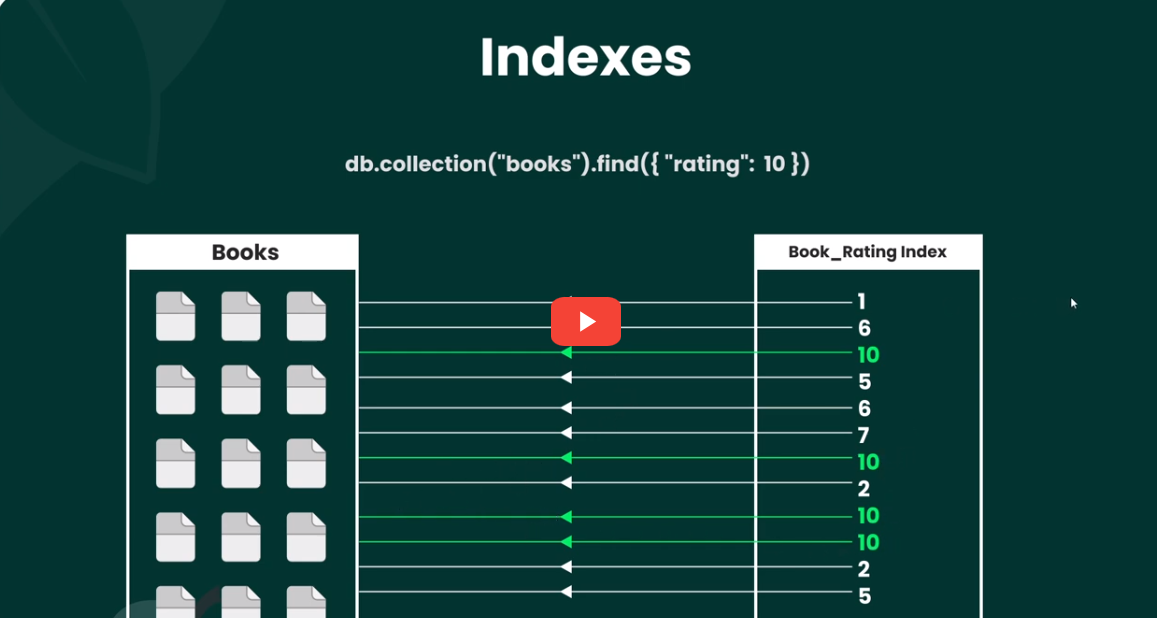
- Its simlar to caching/indexing in order to get results faster
- One thing to be noted that creating index is not appropriate always when the field is write heavy instead of read heavy bcz whenever value is modified or new document is added indexed needs to be updated so it can be costly too if field is write heavy.
- Checking evaluation stats
db.books.find({ rating : 8 }).explain('executionStats')this will return totalDocsExamined as number of all documents - Creating index
db.books.createIndex({rating : 8}) - Print the list of indexed
db.books.getIndexes()Now when checking evaluation stat it will return totalDocsExamined as number of documents where rating of 8 exist - Deleting index
db.books.dropIndex({rating : 8})
Improrting and exporting documents
- To export collection named
booksfrom database namednew2mongoexport --db new2 --collection books --out ~/Desktop/upload/books.json - To import collection named
booksfrom to databasenew3mongoimport --db new3 --collection books --file ~/Desktop/upload/books.json - to export whole database named
new2mongodump -d new2 -o ~/Desktop/upload/new2 - to import database from the dump folder
mongorestore -d new4 ~/Desktop/upload/new2/new2/ - Exporting with certain query
mongosh new2 --quiet --eval 'DBQuery.shellBatchSize = 2000; db.books.find({}).limit(2000).toArray()' > books.jsonas DbQuery.shellBatcjSize is depreciated so use thismongosh new2 --quiet --eval 'config.set("displayBatchSize", 2000); db.books.find({}).limit(2000).toArray()' > books.jsonor with a script file containing query file containing following statementprintjson(db.books.find({}).limit(2000).toArray() )so use this commandmongosh new2 --eval 'load("./Desktop/upload/query.js")'
for remote databases use
mongoexport --uri "mongodb+srv://<username>:<password>@testcluster.7kxguvp.mongodb.net/" --db sample_mflix --collection comments -o ~/Desktop/upload/comments.json