
8.4 KiB
Coding 5 (Parallel Routes)
More advanced topics
Parallel Routes
- Parallel routes are similar to using multiple React components in a layout.jsx file like this Structure
src/app
	complex-dashboard
		users.jsx
		reviews.jsx
		notifications.jsx
		page.jsx
		layout.jsx
	components
		card.jsx
In src/app/complex-dashboard/layout.jsx
import Notifications from "./notifications";
import Reviews from "./reviews";
import Users from "./users";

export default function ComplexDashboardLayout({ children }) {
  return (
    <>
      <div className="">{children}</div> {/* Contents from page.jsx */}
      <div style={{ display: "flex" }}>
        <div style={{ display: "flex", flexDirection: "column" }}>
          <Users /> {/* Contents from users.jsx */}
          <Reviews /> {/* Contents from reviews.jsx */}
        </div>
        <div style={{ display: "flex", flex: 1 }}>
          <Notifications /> {/* Contents from notifications.jsx */}
        </div>
      </div>
    </>
  );
}
In src/app/complex-dashboard/page.jsx
export default function ComplexDashboard() {
  return <h1>Complex Dashboard</h1>;
}
In src/app/complex-dashboard/users.jsx
import Card from "../components/card";

export default function Users() {
  return <Card>Users</Card>;
}
Similarly in reviews.jsx and notifications.jsx
In src/app/components/card.jsx
export default function Card({ children }) {
  const cardStyle = {
    padding: "100px",
    margin: "10px",
    boxShadow: "0 4px 8px 0 rgba(0,0,0,0.2)",
    border: "1px solid #ddd",
    display: "flex",
    justifyContent: "center",
    alignItems: "center",
  };

  return <div style={cardStyle}>{children}</div>;
}
Doing same with parallel routes
- We have to use slots as they help structure our content in modular fashion
- We will use the '@folder_name' convention
- Each slot is passed as a prop to its corresponding 'layout.jsx' file Transfer the files users.jsx, reviews.jsx and notifications.jsx like this
cd $projectRoot/src/app/complex-dashboard
mv users.jsx  @users/page.js
mv reviews.jsx @reviews/page.js
mv notifications.jsx @notifications/page.js
Make sure that instead of 'page.jsx' 'page.js' should be used as that is expected from slots. Components may not rendered if page.jsx is used. Sometimes slot is not added in next so restart the dev server in such case.
Structure
src/app
	complex-dashboard
		@users
			page.js
		@reviews
			page.js
		@notifications
			page.js
		page.jsx
		layout.jsx
	components
		card.jsx
In src/app/complex-dashboard/layout.jsx
export default function ComplexDashboardLayout({
  children,
  notifications,
  users,
  reviews,
}) {
  console.log("users: ", users);

  return (
    <>
      <div className="">{children}</div> {/* Contents from page.jsx */}
      <div style={{ display: "flex" }}>
        <div style={{ display: "flex", flexDirection: "column" }}>
          {users} {/* Contents from users.jsx */}
          {reviews} {/* Contents from reviews.jsx */}
        </div>
        <div style={{ display: "flex", flex: 1 }}>
          {notifications} {/* Contents from notifications.jsx */}
        </div>
      </div>
    </>
  );
}
Benefits of using parallel routes
- Ability to split a single layout into various slots, making the code more manageable though it is also possible with components
Coming to main benefits which is not possible with components
- Independent route handling
Unlike components, these slots can have their own loading and error states as they r handled like other routes without changing the url stack
This gives more control where different sections load at varying speeds or encounter unique errors.
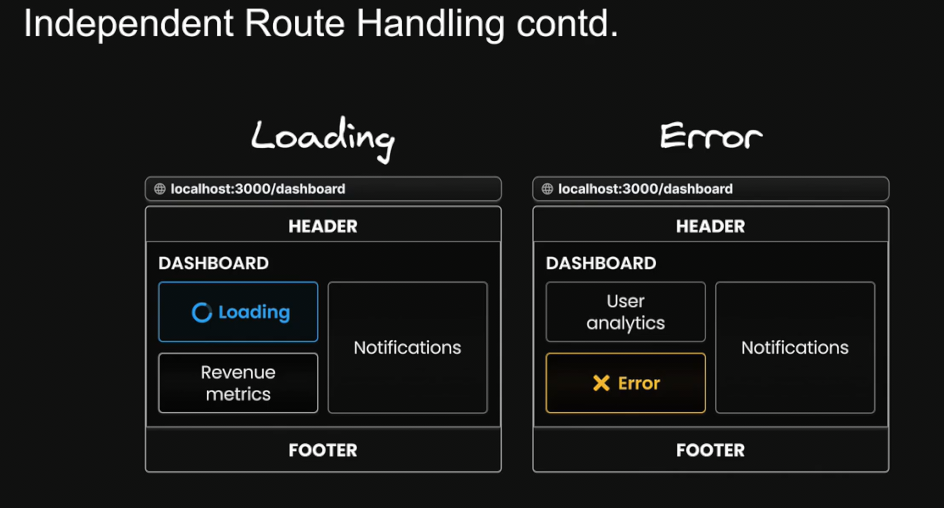
- Sub navigation in routes
- Each slot can function as their own mini application with their own navigation and state management.
If we try to navigate to another route using components then it would be different as component is part of the page and when using
Linkcomponent to change route then whole page has to be loaded so other component will not appear unless they r specifically rerendered in new page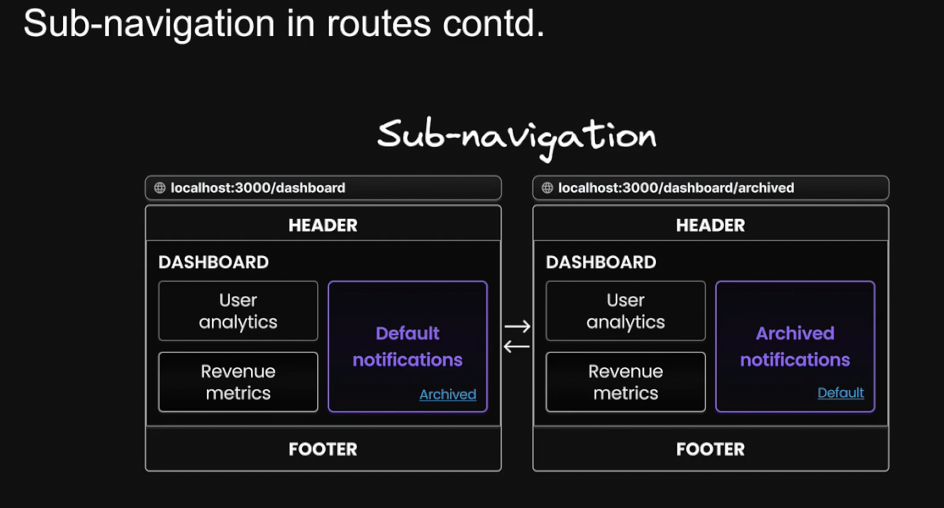
- Each slot can function as their own mini application with their own navigation and state management.
If we try to navigate to another route using components then it would be different as component is part of the page and when using
Unmatched Routes
- Adding a sub navigation in notifications slot Structure
src/app
	complex-dashboard
		@users
			page.js
		@reviews
			page.js
		@notifications
			archived
				page.jsx
			page.js
		page.jsx
		layout.jsx
	components
		card.jsx
In src/app/complex-dashboard/@notifications/archived/page.jsx
import Card from "@/app/components/card";
import Link from "next/link";

export default function Notifications() {
  return (
    <Card>
      <div>Archived Notifications</div>
      <Link href={"/complex-dashboard"}>Default</Link>
    </Card>
  );
}
In src/app/complex-dashboard/@notifications/page.js
import Card from "@/app/components/card";
import Link from "next/link";

export default function Notifications() {
  return (
    <Card>
      <div>Notifications</div>
      <Link href={"/complex-dashboard/archived"}>Archived</Link>
    </Card>
  );
}
When user click on the link named 'Archived' then archived will be added in route so our route will change from localhost:3000/complex-dashboard to localhost:3000/complex-dashboard/archived.
- In layout.jsx there r 4 slots ie props.children, users, reviews and notifications. At
localhost:3000/complex-dashboard/archivedprops.children, users, reviews are unmatched routes as archived folder is inside notifications slot. - When navigating witin the UI and not adding
archiveddirectly with browser, nextjs retains the previously active state of a slot regardless of changes in the URL - During page reload or directly typing archived in url we will get the error 404 if default.jsx is not found in corresponding unmatched slots. Even if one default.jsx is missing in any unmatched slot 404 error will there instead of other matched components getting loaded.
- Adding
default.jsxin unmatched slot is neccessary as it serves as fallback to render contents when nextjs cannot retrieve a slot's active state from the current URL. - We can define the UI for unmatched routes in any way in default.jsx and also mirror the content found in corresponding page.jsx.
Adding
default.jsxin unmatched slots
# copying contents to default.jsx from page.jsx
cd $projectRoot/src/app/complex-dashboard
cp page.js default.js
cp @users/page.js @users/default.js
cp @reviews/page.js @reviews/default.js
Structure
src/app
	complex-dashboard
		@users
			default.js
			page.js
		@reviews
			default.js
			page.js
		@notifications
			archived
				page.jsx
			page.js
		default.js
		page.jsx
		layout.jsx
	components
		card.jsx
Conditional Routes
- With parallel routes it is possible to have conditional routes like login page or register page depending upon state and benefits with loading and error state and sub navigation unlike using component directly.
- Ternary operators can be used for conditional rendering Structure
src/app
	complex-dashboard
		@login.jsx
			default.js
			page.js
		@users
			default.js
			page.js
		@reviews
			default.js
			page.js
		@notifications
			archived
				page.jsx
			page.js
		default.js
		page.jsx
		layout.jsx
	components
		card.jsx
In src/app/complex-dashboard/@login/page.js and src/app/complex-dashboard/@login/default.js
import Card from "@/app/components/card";

export default function Login() {
  return <Card>Please login to continue</Card>;
}
In src/app/complex-dashboard/layout.jsx
export default function ComplexDashboardLayout({
  children,
  notifications,
  users,
  reviews,
  login,
}) {
	// if true that 'please login to continue' section wont appear
  const isLoogedIn = false;
  return isLoogedIn ? (
    <>
      <div className="">{children}</div> {/* Contents from page.jsx */}
      <div style={{ display: "flex" }}>
        <div style={{ display: "flex", flexDirection: "column" }}>
          {users} {/* Contents from users.jsx */}
          {reviews} {/* Contents from reviews.jsx */}
        </div>
        <div style={{ display: "flex", flex: 1 }}>
          {notifications} {/* Contents from notifications.jsx */}
        </div>
      </div>
    </>
  ) : (
    login
  );
}
Make sure that default.js file also exist which can be same as page.js for login slot