
1.9 KiB
Issues and VM
-
GUI not working and get stuck go to other tty using
Ctrl+alt+F2orCtrl+alt+F3.... and access the shell and undo changes which caused such issue -
Stuck with low resolution With virtio as graphic driver, change resolution is display settings of guest os itself
-
Screen tearing Try 3 cases
- Enable 3d acceleration in 'video virtio' section which can be found in view and change console to details
- Enable opengl which in 'display splice'
- Do both
-
Enable Clipboard sharing
- Make sure splice protocol is enabled
- Install
splice-vdagentvia pacman. - Reboot it
-
Enable File sharing https://www.debugpoint.com/share-folder-virt-manager/
- In Details section of current VM go to 'Add Hardware' and add filesystem with source path like
home/user/sharedand target pathshared. Here shared is random name to be used later for mount. Make surevitiofsis there as driver - Then restart VM and make any specific directory like
home/user/sharedand make it as mount point by following commandsudo mount -t virtiofs shared /home/hvm/shared
- In Details section of current VM go to 'Add Hardware' and add filesystem with source path like
-
video driver not working it may be possible that we forget to install linux firmware or video driver is missing so we can use
nomodesetto atleast have access to cli. When in grub navigate to arch linux, dont click enter, typeethere and at end of line starting with linux addnomodesetafter wordquiet. -
Wifi Manager not available
sudo pacman -Sy network-manager-applet -
package repo out of date Neither Your database is outdated and has a link to an old version the mirror doesn't cache every old version if you want to do that you can set up your own mirror that just doesn't delete any packages lol
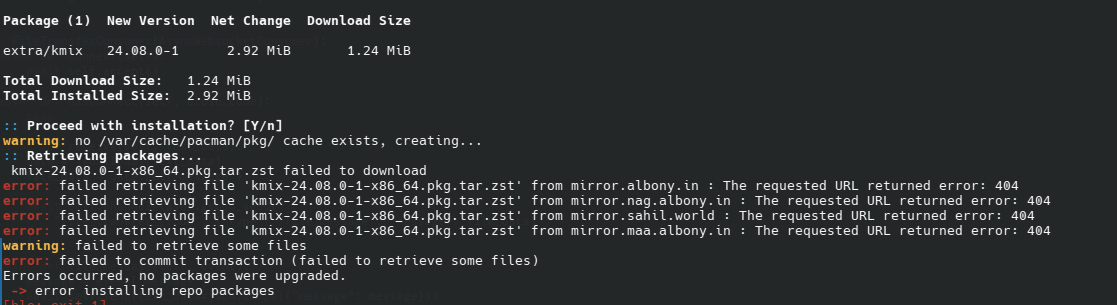 u can use this
https://archive.archlinux.org to download old packages