
6.8 KiB
linux gang useful snippets
- Create Discord Server Invite Using Bot And Channel ID
const { Client } = require('discord.js');
const bot = new Client({ intents: 65 });

bot.on("ready", async () => {
  const channel = bot.channels.cache.get(CHANNEL_ID);
  if (channel) {
      const invite = await channel.createInvite();
      console.log(`Created an invite with the code: https://discord.gg/${invite.code}`);
  } else {
      console.error("Could not find the specified channel or guild.");
  }
});

bot.login(BOT_TOKEN);
- reduce windows latency by a lot
https://youtu.be/n9xAG3nb9XQ
this is a video that explains it well and shows you how to do it
https://files.catbox.moe/btx6iz.mp4 - Find any file on the filesystem with "whatever" in its name
A lot of you probably already know this, and it isn't really a snippet, just a useful little command.
You can usefind / -name "*whatever*"to find any file with "whatever" in the name on the filesystem, obviously you can replace "whatever" with anything you wanna look for and "/" with any directory you wanna look in. - Python html maker
Python html maker - wget using /dev/tcp
wget ()
{
IFS=/ read proto z host query <<< "$1"
exec 3< /dev/tcp/$host/80
{
  echo GET /$query HTTP/1.1
  echo connection: close
  echo host: $host
  echo
} >&3
sed '1,/^$/d' <&3 > $(basename $1)
}
-
Get file length in C(bytes)
#include <stdio.h> FILE* file; int main() { file = fopen("/path/to/file", "rb"); fseek(file, 0L, SEEK_END); long fileSize = ftell(file); fseek(file, 0L, SEEK_SET); printf("The file is %i bytes long\n", fileSize); } -
Simple 'note' command
alias note='echo -e "$(date)" "$\n" "$1" >> ~/notes.txt'
orfunction note () { echo -e "$(date)" "$\n" "$1" >> ~/notes.txt; } note test note again cat ~/notes.txt -
Personal shell aliases
alias -g GONULL="> /dev/null"
alias chfg="$EDITOR -- ~/.zshrc"
alias sosh="source ~/.zshrc"

alias cat="bat --style=grid"
# not inspired by pbcopy
alias pc="xclip -i"
alias pp="xclip -o"
- python board
from turtle import *
import random

def buttonclick(x,y):
    print("{0}, {1}".format(x, y))
onscreenclick(buttonclick,1)

class Cellules():
    def __init__(self, cellule_size=(62, 62), cellules=(10, 10), width=5, tspeed=0):
        self.cs = cellule_size
        self.width = width
        self.cellules = cellules
        self.speed = tspeed

    def start(self):
        dr = Screen()
        #dr.mainloop()
        self.cellule = [[(int(self.cs[0]*i*-1), int(self.cs[1]*j)) for j in range(int(-1*(self.cellules[1])/2), int((self.cellules[1])/2))] for i in range(int(-1*self.cellules[0]/2), int(self.cellules[0]/2))]
        #self.cellule = self.cellule[1::]
        self.cellule = [i[::-1] for i in self.cellule[::-1]]
        print(self.cellule)
        dr.setup(width=1+self.cs[0]*self.cellules[0], height=1+self.cs[1]*self.cellules[1])
        width(5)
        speed(self.speed)

    def fill(self, go, colour):
        penup()
        goto(self.cellule[go[0]][go[1]][0], self.cellule[go[0]][go[1]][1])
        pendown()
        print(self.cellule[go[0]][go[1]][0], self.cellule[go[0]][go[1]][1])
        begin_fill()
        color(colour)
        width, height = self.cs
        left(180)
        for i in range(2):
            forward(width)
            right(90)
            forward(height)
            right(90)
        end_fill()

    def add(self, x, y):
        self.fill((x, y), "black")

    def rm(self, x, y):
        self.fill((x, y), "white")


#cellules = Cellules(cellules=(nombres_des_abscices, nombre_des_ordonnee), cellule_size=(la_largeur, la_longueur))
cellules = Cellules(cellules=(50, 50), cellule_size=(12.4, 12.4))
cellules.start()

#cellules.add(x, y)
cellules.add(0, 0)

done()
# Print my public IP
alias myip='curl ipinfo.io/ip'
# or
alias myip2='curl ipwho.de'
-
Symbolic links
https://linuxhint.com/create-symbolic-links-manjaro/
ln -s [path-of-target-file] [path-of-symlink-file]
ln -s linuxhint.txt symfile.txt
For verification of symbolic link
ls -l sym_dir
For full path sym links
You can turn relative paths into full paths using readlink -f foo. So you would do something like:
ln -s $(readlink -f $origlink) $newlink -
Caption any image (and optionally convert it to a gif) Requires:
xclip kalker imagemagick ffmpeg dmenuKalker is in the AUR, everything else is in normal arch repos Usage:caption <url or file>will let you add a caption and convert into either image or gif for videos and gifs, use only gif as your convert option Also automatically puts images into clipboard; Gifs output to /tmp/cap.gif Code:#!/bin/sh CAPTION=$(: | eval "dmenu -p \"Search\"") IMAGE=$1 image() { width=`identify -format %w $IMAGE` echo $width convert $IMAGE -size ${width}x -gravity Center -background white -fill black -pointsize $(echo $width/13 | kalker) -font Fira-Code-Bold caption:"$CAPTION" +swap -gravity Center -append /tmp/caption.png xclip -selection c -t image/png /tmp/caption.png rm /tmp/caption.png } gif() { mkdir -p /tmp/caption ffmpeg -i $IMAGE /tmp/caption/cap%04d.png width=`identify -format %w /tmp/caption/cap0001.png` framerate=`ffmpeg -i $IMAGE 2>&1 | sed -n "s/.*, \(.*\) fp.*/\1/p"` for i in /tmp/caption/cap*.png; do echo $i convert $i -size ${width}x -gravity Center -background white -fill black -pointsize $(echo $width/13 | kalker) -font Fira-Code-Bold caption:"$CAPTION" +swap -gravity Center -append "$i.new.png" done; ffmpeg -y -i /tmp/caption/cap%04d.png.new.png -vf "fps=$framerate,split[s0][s1];[s0]palettegen[p];[s1][p]paletteuse" -fs 8M /tmp/cap.gif xclip -selection c -t image/gif /tmp/cap.gif rm -r /tmp/caption # rm /tmp/cap.gif notify-send "complete" } case $(printf "gif\nimage" | dmenu -i -p "is gif?") in gif) gif;; image) image ;; *) exit 1;; esac -
Just drag and drop the text file you need to fix on top of the executable, should overwrite it with the correct version Or you can call it from the command line like .\FixEncoding file1.txt file2.txt file3.txt etc.... using System.Text;
for (int i = 0; i < args.Length; i++) File.WriteAllText(args[i], Encoding.Default.GetString(Encoding.Convert(Encoding.Unicode, Encoding.UTF8, Encoding.Unicode.GetBytes(File.ReadAllText(args[i]))))); -
check weather
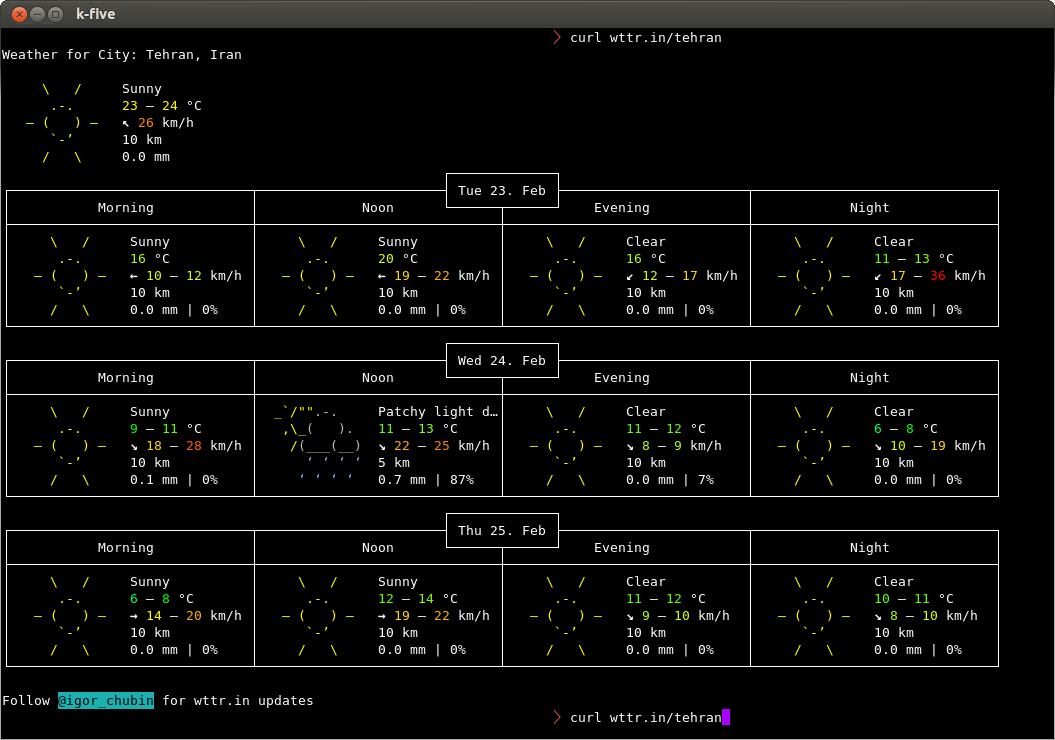
curl wttr.in