
46 KiB
Extras
-
debug in mobile browser
https://github.com/liriliri/eruda
Add this as bookmark and give name ‘Eruda Devtool’
javascript:(function () { var script = document.createElement('script'); script.src="//cdn.jsdelivr.net/npm/eruda"; document.body.appendChild(script); script.onload = function () { eruda.init() } })();
-
character to ascii values and vice versa in py
>>> chr(65) 'A' >>> chr(120) 'x' >>> chr(ord('S') + 1) 'T' -
ASCII table
Dec Char Dec Char Dec Char Dec Char --------- --------- --------- ---------- 0 NUL (null) 32 SPACE 64 @ 96 ` 1 SOH (start of heading) 33 ! 65 A 97 a 2 STX (start of text) 34 " 66 B 98 b 3 ETX (end of text) 35 # 67 C 99 c 4 EOT (end of transmission) 36 $ 68 D 100 d 5 ENQ (enquiry) 37 % 69 E 101 e 6 ACK (acknowledge) 38 & 70 F 102 f 7 BEL (bell) 39 ' 71 G 103 g 8 BS (backspace) 40 ( 72 H 104 h 9 TAB (horizontal tab) 41 ) 73 I 105 i 10 LF (NL line feed, new line) 42 * 74 J 106 j 11 VT (vertical tab) 43 + 75 K 107 k 12 FF (NP form feed, new page) 44 , 76 L 108 l 13 CR (carriage return) 45 - 77 M 109 m 14 SO (shift out) 46 . 78 N 110 n 15 SI (shift in) 47 / 79 O 111 o 16 DLE (data link escape) 48 0 80 P 112 p 17 DC1 (device control 1) 49 1 81 Q 113 q 18 DC2 (device control 2) 50 2 82 R 114 r 19 DC3 (device control 3) 51 3 83 S 115 s 20 DC4 (device control 4) 52 4 84 T 116 t 21 NAK (negative acknowledge) 53 5 85 U 117 u 22 SYN (synchronous idle) 54 6 86 V 118 v 23 ETB (end of trans. block) 55 7 87 W 119 w 24 CAN (cancel) 56 8 88 X 120 x 25 EM (end of medium) 57 9 89 Y 121 y 26 SUB (substitute) 58 : 90 Z 122 z 27 ESC (escape) 59 ; 91 [ 123 { 28 FS (file separator) 60 < 92 \ 124 | 29 GS (group separator) 61 = 93 ] 125 } 30 RS (record separator) 62 > 94 ^ 126 ~ 31 US (unit separator) 63 ? 95 _ 127 DEL -
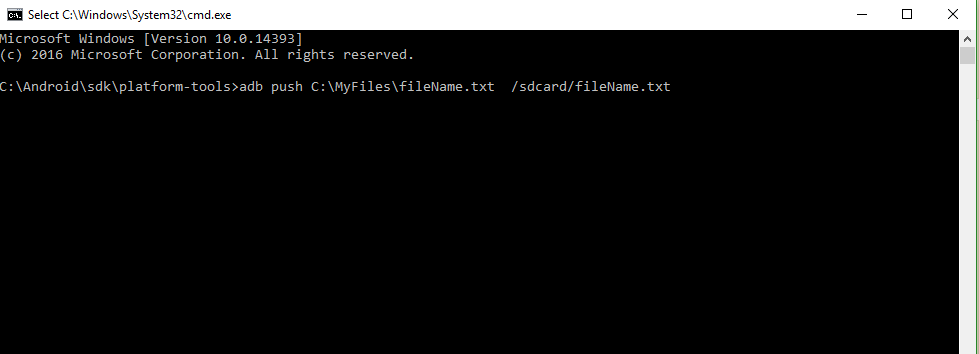
Transfer files from pc to emulator
-
Spotify playlist
https://developer.spotify.com/documentation/web-api/reference/#/operations/get-playlist
https://www.sohamkamani.com/nodejs/rsa-encryption/
-
Non microsoft vscode ie VsCodium
C:\Users\h.vscode\extensions : contains extensions for vs code
C:\Users\h.vscode-oss\extensions: contains extension for vscodium
here h is username
Not all extensions are available so just transfer extensions from vs code to vscodium manually.
use package manager to install vscodium.
for windows use:
winget install vscodium-
comments
@Existentialist
There is a trick for that. I have both vscode and vscodium installed. If desired extension is not avaiable in vscodium extension store then i download it from vscode store and copy its folder from .vscode/extensions to .vscode-oss/extensions.
-
-
Multiple vs code
https://stackoverflow.com/questions/68047117/how-to-install-two-vs-code
changing extension directory:
What I did - after installing Visual Studio Code for the first time, I checked the documentation and added at the end of 'Target' field of editor's shortcut the following (there's a space before the two dashes):
 --extensions-dir="DRIVELETTER:\VSCODE\extensions"
 --user-data-dir="DRIVELETTER:\VSCODE\settings"
where DRIVERLETTER and VSCODE are the corresponding drive and directory where Visual Studio Code is installed. So mine looks like this:
"D:\Microsoft VS Code\Code.exe" --extensions-dir="D:\Microsoft VS Code\extensions"Here is for the user data directory:
"D:\Microsoft VS Code\Code.exe" --user-data-dir="D:\Microsoft VS Code\settings"Accessing the 'Target' field is done by right-clicking the shortcut and choosing 'Properties'
Anyway, there's a simpler solution to that problem - just use the portable version of Visual Studio Code. It works under Windows, Linux, and macOS:
for windows:
@START codium --extensions-dir="C:\Users\hp\Videos\imp\web\extensions" --user-data-dir="C:\Users\hp\Videos\imp\web\User" -
Chromium archive builds
https://src.chromium.org/viewvc/chrome/releases/1.0.154.53/src/
older executable: https://vikyd.github.io/download-chromium-history-version/#/
-
Cloud Storage APIs
https://www.reddit.com/r/Python/comments/gm3irp/did_anyone_upload_files_to_degoo_cloud_via/
LBRY: video streaming based on blockchain
-
Enable usb debugging on android
****Go to the Setting tab
Step 2: Go to About Phone
Step 3: Click several times on Build number
Step 4: You will then get a pop-up message that reads "You are under developer mode"
Step 5: Go back to Settings
Step 6: Click on Developer options
Step 7: Then check "USB debugging"
-
Permanent deletion of files in android
With the increasing cases of identity theft and data breaches, it is certainly important to know the right way to dispose our data. Well, if you want to permanently delete your photos and videos from your phone, then I would recommend the following solutions.
Delete media files manually
Well, the easiest solution would be deleting your photos and videos manually from your device. Just go to the Gallery app and select what you wish to get rid of. Afterward, make sure that you visit the “Recently Deleted” album where your photos are saved temporarily. Now, delete your photos from here as well to remove them permanently.
Factory Reset your Device
If you want to permanently delete everything from your phone, then consider performing a factory reset. If you have an iPhone, then just go to its Settings > General > Reset for this while Android users can find it in Settings > Reset as well. This will erase not just photos, but all the saved content and stored settings from your phone.
Use a Professional Data Eraser
If you just factory reset or manually delete your photos, then anyone can extract them using a data recovery tool. Therefore, if you are concerned about your privacy, then consider using dr.fone – Data Eraser. There are dedicated applications for both iOS and Android that you can try. Using them, you can connect your device, and follow a simple click-through process to completely wipe your data. This will erase all your photos and videos beyond the scope of recovery.
-
Block installation
0
MacroDroid here can save u: Let's be simple;
- Download and install MacroDroid
- Press Add Macro
- Select Trigger to be Application Launched
- Check non-launchable apps
- Locate Package installer and select it
- Go to Actions tab
- Select Launch Home Screen
- Go to constraints and chose any other thing you want it to consider before executing that action you configured above or just leave it blank
- Give your Macro a name and save it
- You're ready to go
Note: give macrodroid all permissions possible as requested. The macro will look as below

-
Google search hacks
-
better third party upload api
-
ytdl core nodejs
-
Merge audio nd video in browser
-
Create custom video downloader
https://javascript.plainenglish.io/make-your-own-youtube-downloader-626133572429
-
Stream downloads
https://philna.sh/blog/2020/08/06/how-to-stream-file-downloads-in-Node-js-with-got/
-
remote url download like google drive
pcloud
https://gofile.io/ have api option too
fileLu : closed file system upload
filebin.net: open file system upload
Internet archive
-
redis caching nodejs
https://www.digitalocean.com/community/tutorials/how-to-implement-caching-in-node-js-using-redis
-
CORS proxy
proxy.cors.sh
whateverorigin.org
fetch("https://proxy.cors.sh/https://acme.com", { headers: { "x-cors-api-key": "temp_6ed182fc89f2d7dc756368139fed3299", }, }); const proxy = "https://proxy.cors.sh"; const key = "temp_6ed182fc89f2d7dc756368139fed3299"; const res = await fetch( `http://www.whateverorigin.org/get?url=http://www.google.com` ); -
github api
https://api.github.com/users/kroeckx: for getting user info from username
https://api.github.com/search/users?q=kurt@roeckx.be : getting username from email address if public
-
Script to copy project excluding node_modules
const fs=require('fs') const path=require('path') const copyFiles=(folder,folderPath)=> { const fileregex=/.+\..+/ const files=fs.readdirSync(folderPath) console.log('files: ',files) for(let file of files) { const filePath=`${folderPath}/${file}` const destinationFilePath=filePath.replace(__dirname,`${__dirname}_copy`) const destinationFolderPath=folderPath.replace(__dirname,`${__dirname}_copy`) if(file==='node_modules'||file==='audios'||file==='songs') { continue; } if(fs.lstatSync(filePath).isDirectory() ) { copyFiles(file,filePath) } console.log(filePath,destinationFilePath) fs.mkdirSync(destinationFolderPath,{recursive: true}) if(!fs.lstatSync(filePath).isDirectory() ) { const dataFile=fs.readFileSync(filePath) fs.writeFileSync(destinationFilePath,dataFile) } } } copyFiles(__dirname,`${__dirname}`) -
Cheerio features
loop over elements:
import fetch from 'node-fetch'; import { load } from 'cheerio'; const url = 'http://webcode.me/countries.html' const response = await fetch(url); const body = await response.text(); let $ = load(body); $('tr').each((_, e) => { let row = $(e).text().replace(/(\s+)/g, ' '); console.log(`${row}`); }); -
Extracting youtube id
let regex=/watch\?v=([a-zA-Z0-9_-]+)[&]?/ -
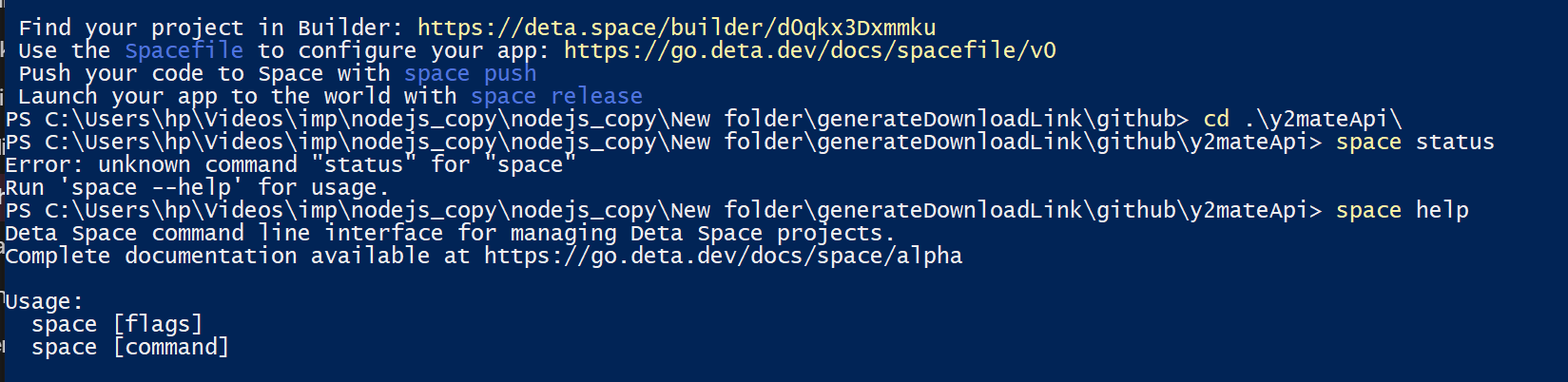
deta features
-
yt download Links
https://wave.video/convert/youtube-to-mp4
https://ssyoutube.youtubemini.com/#url=https://www.youtube.com/watch?v=X3jw1JVNdPE
-
New way to download audio from youtube after throttling
const getAudioLink = async (url) => { const info = await ytdl.getInfo(url); const { formats } = info; const title = info.videoDetails.title; const getDownloadLinkByItag = (formats, itag) => { const formatObj = formats.find((format) => format.itag === Number(itag)); if (formatObj.itag === 140) { return { url: formatObj.url, cL: formatObj.contentLength }; } return formatObj.url; }; const itag = "140"; let dobj = getDownloadLinkByItag(formats, itag); let dURL = dobj.url; const end = dobj.cL; dURL = dURL + `&title=${encodeURIComponent(title)}&range=0-${end}`; console.log("audio durl: ", dURL); const urlDown = await tiny.shorten(dURL); // const urlDown = dURL; return { urlDown, title }; // const format2 = ytdl.chooseFormat(info.formats, { quality: `140` }); // console.log("🚀 ~ file: app.js ~ line 54 ~ app.post ~ format2", format2); // try { // // ytdl.downloadFromInfo(format).pipe(fs.createWriteStream("video.mp4")); // const audio = ytdl(url, { // filter: (format) => { // // format1.container === "mp4" && format1.hasAudio === true, // // console.log("🚀 ~ file: app.js ~ line 33 ~ app.post ~ format1", format1); // return isEqual(format, format2); // }, // }); // return audio; // } catch (err) { // console.log(err); // throw new Error(err.toString()); // } }; -
Logger for js
https://stackoverflow.com/questions/41232578/node-js-console-log-in-txt-file
https://www.npmjs.com/package/log4js
var log4js = require("log4js"); var logger = log4js.getLogger(); logger.level = "debug"; logger.debug("Some debug messages"); -
upload file to ipfs nodejs
https://portal.thirdweb.com/api-keys?ref=blog.thirdweb.com
const { ThirdwebStorage } = require("@thirdweb-dev/storage"); const fs = require("fs"); const storage = new ThirdwebStorage({ secretKey: "YOUR_SECRET_KEY", // You can get one from dashboard settings }); const ipFsUpload = async (titles) => { // const upload = await storage.upload({ // metadata: { name: "ghu.mp3" }, // alwaysUpload: true, // }); const buffers = titles.map((title) => fs.readFileSync(`music/${title}.mp3`)); // const uploads = await storage.uploadBatch([ // fs.readFileSync("Holiday_Boulevard_of_Broken_Dreams.mp3"), // fs.readFileSync("test.txt"), // ]); const uploads = await storage.uploadBatch(buffers); // const upload = await storage.upload({ // name: "gh.mp3", // file: fs.readFileSync("test.txt"), // }); // const gatewayURLS = uploads.map((upload) => storage.resolveScheme(upload)); const gatewayURLS = []; for (let i = 0; i < uploads.length; i++) { const upload = uploads[i]; const title = titles[i]; const gatewayURL = storage.resolveScheme(upload); const obj = { url: gatewayURL, title }; gatewayURLS.push(obj); } console.log("gateway urls: ", gatewayURLS); return gatewayURLS; // console.log(`Gateway URL - ${storage.resolveScheme(upload[0])}`); }; module.exports = { ipFsUpload }; -
Clarifai api march 2023
const raw = JSON.stringify({
  "user_app_id": {
    "user_id": "clarifai",
    "app_id": "main"
  },
  "inputs": [
      {
          "data": {
              "image": {
                  "url": "IMAGE_URL",
                                    "base64": "base64_string"
              }
          }
      }
  ]
});

const requestOptions = {
    method: 'POST',
    headers: {
        'Accept': 'application/json',
        'Authorization': 'Key ' + 'your key'
    },
    body: raw
};

// NOTE: MODEL_VERSION_ID is optional, you can also call prediction with the MODEL_ID only
// https://api.clarifai.com/v2/models/{YOUR_MODEL_ID}/outputs
// this will default to the latest version_id

fetch(`https://api.clarifai.com/v2/models/face-detection/versions/6dc7e46bc9124c5c8824be4822abe105/outputs`, requestOptions)
    .then(response => response.text())
    .then(result => console.log(result))
    .catch(error => console.log('error', error));
https://www.markdowntutorial.com/
-
youtube search without api
-
Remove constant popup of winrar for free
just add a rarreg.key file in winrar folder
-
insert html at caret in contenteditable element
function pasteHtmlAtCaret(html) { var sel, range; if (window.getSelection) { // IE9 and non-IE sel = window.getSelection(); if (sel.getRangeAt && sel.rangeCount) { // get selected area details range = sel.getRangeAt(0); //deleting the selected region range.deleteContents(); // Range.createContextualFragment() would be useful here but is // non-standard and not supported in all browsers (IE9, for one) var el = document.createElement("div"); el.innerHTML = html; // offscreen dom tree creation as inserted between instead of last var frag = document.createDocumentFragment(), node, lastNode; // extract elements from div container and appending it to document fragment while ((node = el.firstChild)) { lastNode = frag.appendChild(node); } range.insertNode(frag); // Preserve the selection if (lastNode) { // range = range.cloneRange(); // to unselect and push caret to last range.setStartAfter(lastNode); range.collapse(true); // if not removed then cursor wont be at last sel.removeAllRanges(); sel.addRange(range); } } } else if (document.selection && document.selection.type != "Control") { // IE < 9 document.selection.createRange().pasteHTML(html); } } -
Fix com surrogate high memory usage
https://www.youtube.com/watch?v=YXhB3eNk9I8 https://small.fileditchstuff.me/s5/qIZWhbEWyHBvWUgpdrLO.mp4
-
onchange event attribute in html
function create_comboA(your_Object) {

  var my_value = your_Object.my_value;

  console.log(my_value);

}

<select id="create_comboA" onchange="create_comboA(this)">

  <option value="">Choose the combo</option>

  <option value="First Option">Apple</option>

  <option value="Second Option">Orange</option>

  <option value="Third Option">Banana</option>

</select>
here this is equivalent to e.target
event is equivalent to e
-
Simple connection
<!DOCTYPE html>
<html lang="en">
  <head>
    <style>
      input {
        width: 200px;
        height: 2rem;
      }
    </style>
    <meta charset="UTF-8" />
    <meta http-equiv="X-UA-Compatible" content="IE=edge" />
    <meta name="viewport" content="width=device-width, initial-scale=1.0" />
    <title>Document</title>
  </head>
  <body>
    <input type="text" oninput="handleChange(this)" autofocus />
    <script src="script.js"></script>
  </body>
</html>
const handleChange = (e) => { let str = e.value; console.log("str: ", str); fetch("/send", { method: "post", body: JSON.stringify({ text: str }), headers: { "content-type": "application/json", // accept: "Application/octet-stream", }, }); };const express = require("express"); const app = express(); app.use(express.static(__dirname + "/public")); app.use(express.json()); app.post("/send", (req, res) => { const { text } = req.body; console.log(text); }); app.listen(3000, () => { console.log("listening"); }); -
Sublime Text Palenight theme missing fix
The Palenight theme is not included in the Midnight theme package. You need to install the Palenight theme separately. You can do this by following these steps:
- Open Sublime Text and go to Preferences > Browse Packages.
- In the Packages directory, create a new folder called
Palenight. - Clone the Palenight theme repository: https://github.com/jbrooksuk/palenight-sublime-text into the
Palenightfolder. - Restart Sublime Text.
The Palenight theme should now be available in the Color Scheme menu.
Here are some additional troubleshooting steps you can try if the Palenight theme is still not available:
- Make sure that you have installed the latest version of the Palenight theme.
- Verify that the
Palenightfolder is located in thePackagesdirectory. - Restart Sublime Text multiple times.
- Clear your Sublime Text settings.
-
Docker
https://medium.com/swlh/containerize-your-personal-projects-with-docker-fe62ca391db8
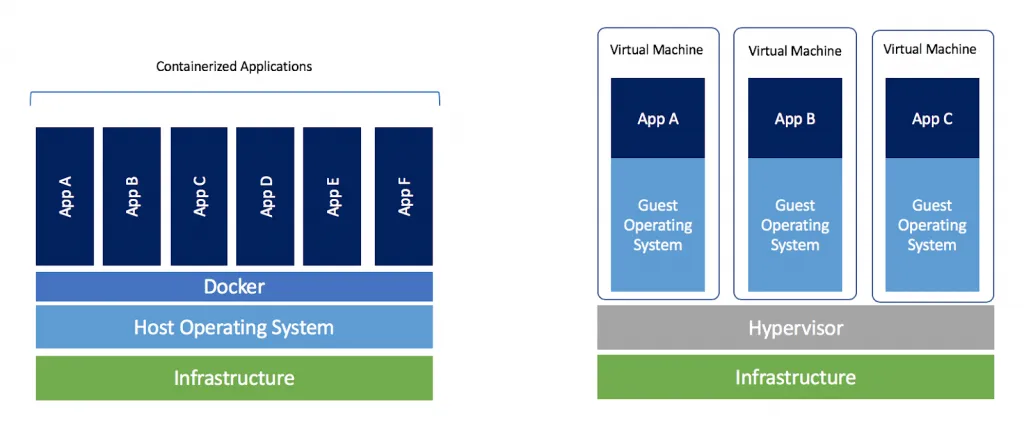
Dockerfile saved with name ‘Dockerfile’ no extension
FROM node:12

WORKDIR /app

COPY package*.json ./

RUN npm install

COPY . .

ENV PORT=8080

EXPOSE 8080

CMD [ "npm","start" ]
just like .gitignore there is a file name .dockerignore to exclude mentioned files or folder
node_modulesbuilding image:
docker build -t username/first_app:1.0it will produce an output and will produce image starting with sha……
To run the image use:
docker run <image_name/code>Now if we try to run it with port(here in eg port is 8080) then it wont run because by default its not accessible outside container so to expose it we can use port forwarding.
docker run -p 5000:8080 <image_name/code>port 8080 of container is forwarded to port 5000 of outside container. 5000:8080 is mapping
-
For publishing
Now login through the CLI by executing:
docker loginPush your Docker Image to the Docker Hub repository with the following command:
docker image push <repository>/<image>:<tag>Example:
docker image push dhanushkamath/dockerize-node:1.0.0You’ve successfully published your first image to the world!
Running this container on a different computer that has Docker only requires a single command:
docker run dhanushkamath/dockerize-node:1.0.0
-
-
RSA
https://www.geeksforgeeks.org/rsa-algorithm-cryptography/
Note: If your public key's n (modulo) is 4096 bits, then your message can't exceed 4096 bits (realistically even less because of padding)
Select two prime no's. Suppose
P = 53 and Q = 59.
Now First part of the Public key  : n = P*Q = 3127.
But e Must be An integer.Not be a factor of Φ(n). 1 < e <Φ(n) Φ(n) = (P-1)(Q-1) so, Φ(n) = 3016 Eg: For e=3, Φ(n)%e !=0 so e is not factor of Φ(n).Now calculate Private Key,d d = (k*Φ(n) + 1) / e for some integer k or D*e mod φ (n) = 1 at k=2, (2*3016+1)/3 =( 6032+1)/3=6033/3= 2011 d=2011Public Key= <e,n> = <3,3127>
Private Key=<d,n> <2011,3127>
Encryption:
(m^e)mod(n) here a mod b = a%b ⇒ mod is modulus operator
m=3
(3^3)%3127=27%3127=27
c=27
Decryption:
(c^d)mod n
27^2011 % 3127
-
Complex calculation
https://www.youtube.com/watch?v=EiZGCSsKtfM
https://stackoverflow.com/questions/45381402/rsa-exponent-size
-
Stack overflow
Let's say
Mis the modulus. So YES, you could first performintermediate = 65^e, and finally computeintermediate mod M. And of course,intermediatewould be a very very very very big integer (ifeequals 65537, the decimal representation ofintermediatecontains 118813 digits!).BUT, thanks to a very basic modular arithmetic theorem,
(65^e) mod M = ((((65 mod M) * 65) mod M) * 65) mod M [...] (e times)(the theorem states that in a quotient ring, the n-th power of the class of an element is the class of the n-th power of the element)
As you can see, this does not need any very big integer library, since after each arithmetic product, you use
mod Mthat returns an integer between0andM-1. So, you only have to compute arithmetic products of integers less than M.As an example, here is a simple shell script (bash) that computes 65^65537 mod 991*997. As you can see, no need to get a big number library:
#!/bin/bash

# set RSA parameters
m=65           # message to encode
M=$((991*997)) # modulus (both 991 and 997 are prime numbers)
e=65537        # public exponent (coprime with 990*996, thus compliant with RSA algorithm)

# compute (m^e) mod M
ret=1
for i in {1..$e}
do
  ret=$(((ret*m)%M))
done

# display the result
echo $ret
It immediately returns
784933, thus65^65537 mod 991*997 = 784933The biggest integer computed with your method of calculus has 118813 digits, but the biggest integer handled with this shell script only has 12 or less digits (
(M-1)^2is made of 12 digits).According to these explanations, we can now answer your question:
My question is then, for the working RSA algorithm, what size (number of digits) number does that algorithm pick?
With the above explanations, you can see that the maximum number of digits in the decimal representation of integers you have to manipulate is
1+log10((M-1)^2), because you will, at most, compute a product of two integers between0andM-1.Note that
1+log10((M-1)^2) = 1+2.log10(M-1) < 2+2.log10(M) = 2.(1+log10(M)). Also note that1+log10(M)is the number of digits of M.Therefore, as a conclusion, this proves that the number of digits your library has to handle correctly is twice the number of digits of the modulus (if you are computing the exponentiation using integer multiplications the way explained here).
Calculate Large Exponents
Calculating large exponents and modular arithmetic can be complex. For such calculations, you can use a calculator or programming language with built-in support for handling large numbers and modular arithmetic. In this case, you're looking to calculate 56^{2346} \mod 564562346mod564.
If you want to do this using a programming language like Python, you can use thepow()function along with the modulus operator%:pythonCopy coderesult = pow(56, 2346, 564) print(result)If you don't have access to programming tools, you might need to use a calculator that supports large number calculations and modular arithmetic. Many scientific calculators and online calculator tools have this capability. Just make sure to enter the values and operations correctly.
Keep in mind that the result will be a large number, so ensure you're using tools that can handle such calculations accurately.I mean arent there any mathematical properties to handle thisChatGPT
Yes, there are mathematical properties that can help simplify and handle calculations involving large exponents and modular arithmetic. One property that's particularly useful is the modular exponentiation property. This property states that for any positive integers aa, bb, and mm, you can compute a^b \mod mabmodm efficiently without actually calculating the huge exponentiation.Here's the general idea:
- Start with a result variable initialized to 1.
- Iterate through the binary representation of bb, from the least significant bit to the most significant bit.
- For each bit, if it's 1, multiply the result by aa and take the result modulo mm.
- Square aa and take the result modulo mm in each iteration.
- The final result will be a^b \mod mabmodm.
This method significantly reduces the number of multiplications and calculations required compared to naively calculating a^bab and then taking the modulus.
For example, to calculate 56^{2346} \mod 564562346mod564, you would apply the above steps using a = 56a=56, b = 2346b=2346, and m = 564m=564.
However, this approach still involves some complex calculations. If you're not comfortable performing these calculations manually, it's best to use a programming language or calculator with built-in support for modular exponentiation.Ok so use these steps to solve this ChatGPT
Main:
Certainly! Let's use the modular exponentiation property to calculate 56^{2346} \mod 564562346mod564:
- Start with the result variable res = 1res=1.
- Convert the exponent 2346 to binary: 2346_{10} = 100100101010_{2}234610=1001001010102.
- Iterate through the binary representation of the exponent:
◦ First bit: 00. Square 56 and take the result modulo 564.
◦ Second bit: 11. Multiply 56 by 56, take the result modulo 564, and then square the result.
◦ Third bit: 00. Square the result again.
◦ ... - After iterating through all bits, the final result will be res = 56^{2346} mod 564
Using the steps above, you can perform the calculations iteratively: - res = 1
- res = 56^2 mod 564 = 3136 mod 564 = 220
- res = 220 * 56^2 mod 564 = 220 * 3136 mod 564 = 4476 mod 564 = 348
- ... (continue squaring and multiplying as per the binary representation of the exponent)
After completing all the steps, the final result res will be the value of 56^{2346} mod 564
Taking another example:
2^9 mod 100
9=1001 in binary form
res=1
If bit is:
1: multiply by base which is 2 here ⇒ res*2
0: square it ⇒ res^2
from right to left:
First significant bit(rightmost) ie 1: res=res*2 mod 100=2 mod 100 = 2
2nd bit ie 0: res=res^2=4 mod 100 = 4
3rd bit ie 0. res=res^2= 4*4=16 mod 100 = 16
-
-
-
YouTube alternative
Invidious
libreddit
-
To learn
Non free js/ librejs
Floorp Firefox engine browser like vivaldi
Midori
-
Cons of matlab
1: index starts at 1.
2: % is not recognized as modulus. rem function has to be used.
3; Ambiguous syntax
https://www.rath.org/matlab-is-a-terrible-programming-language.html
-
Browsers
Librewolf
Mullwad : tor without tor network
waterfox
Falkon
midori
-
Email https://eylenburg.github.io/cloud_comparison.htm skiff (2021-2024)
disroot : https://disroot.org/en/services/email
tutanota(now called tuta) (since 2016) (6 months of inactivity) https://www.reddit.com/r/PrivacyGuides/comments/v2v6rw/email_provider_recommendations_free_imappop/ abv bg : bulgariian email service https://www.fsf.org/resources/webmail-systems : free emails https://veilmail.io/ : generate alias for email https://app.simplelogin.io/ : to create alias for proton mail (upto 10 alias) https://app.addy.io/register : upto 10 firefox relay (alias service) : cant generate custom alias though https://www.techradar.com/pro/free-email-accounts-listed-and-compared like vielmail there are Blur and 33mail zoho : (since 2008) (needs phone number) proton (since 2014) gmail (since 2004) riseup(since 1999) mail.com(need usa or europe IP, also need valid phone number) ctemplar(2019-2022) aol(needs local phone number), similarly Daum Mail , naver mail and yandex mail mailfence(7 months of inactivity) onmail : (since 2020 -2025) rmail (since 2022) mailo aster mail (since apr 2026) atomic mail (subce 2024) autistici/inventi (2001-2026) adminforge infomaniak (need phone number verification by reverse calling) https://keepitfree.ai/it/announcements/a/i-chiude-restare-umani/ A_I Closes Stay Human · Keep the Internet free (15_9_2026 12:00:45 pm).html
email client: thunderbird fairemail: for android smtp providers https://mailtrap.io/blog/free-smtp-servers/ mailgun (to 5 users only, 5k/month) sendgrid (1k/month) brevo(need phone number and cant be verified with temp ones,also address) smtp2go(1k/month, need private domain) sendpulse(12k/month) blogmail : requires domain mailtrap : requires domain(3k/month) mailsend(1k/month) (provides u with your temporary domain) elastic email (100/day)
https://elasticemail.com/developers/api-documentation/rest-api#section/Authentication
-
Search engine
duckduckgo
startpage : https://www.startpage.com qwant.com (not availble in india though) brave search ecosia (google and bing result) : does tracked by google though https://altpower.app searxing : https://priv.au (instance), https://www.gruble.de/ https://degoog.org/
-
Mirrors
https://github.com/mendel5/alternative-front-ends
https://mike.sg/2022/07/10/how-to-use-libredirect-on-android/
libreddit https://libreddit.northboot.xyz/ : read-only
Teddit
whoogle: https://whoogle-search--replitcomreside.repl.co/, google
searx, weird one : for unbiased search result : https://searx.work/
https://github.com/benbusby/whoogle-search#public-instances
Nitter: read only for twitter
https://github.com/libreddit/libreddit-instances/blob/master/instances.md
invidous: yewtu.be
simple translate, lingwa translate
libremd: imdb mirror
quetre : quora mirror
rimgo: imgur mirror https://rimgo.kling.gg/
-
VPN
hide me
windscribe
riseup : need invite codes for email but for vpn it needs snapd
atlas
cloudfare dns
-
Download page
singlefile extension
-
Coral
https://coral-sim.zybooks.com/
it shows execution for code in animation and draws flowchart itself
-
spotify recorder
spy-spotify : spytify software
-
Virtual box resolution fixing
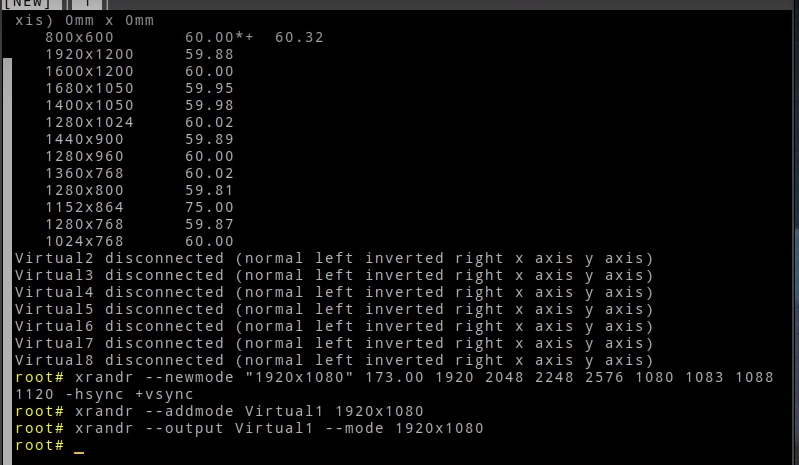
xrandr --newmode "1920x1080" 173.00 1920 2048 2248 2576 1080 1083 1088 1120 -hsync +vsync xrandr --addmode Virtual1 1920x1080 xrandr --output Virtual1 --mode 1920x1080 -
Mobile browser with extension support
Lemur browser : chromium based closed source
kiwi : chromium based closed source
firefox : open source
yandex : russian chromiium based
-
Video/image upload
name allows variety anon uploads direct links galleries gifs mp4s popups upload limit catbox.moe yes yes yes yes yes yes yes 200 mb, (Gif 20 mb) freeimage.host yes yes yes yes yes no no 64 mb imgbox.com yes yes yes yes yes no yes 10 mb imgchest.com yes yes yes yes yes no no 20 mb lensdump.com yes no yes yes yes no no 100 mb pixhost.to yes yes yes yes yes no no 10 mb postimages.org yes yes yes yes yes no no 24 mb redgifs.com yes no no yes yes yes yes 1 gb steamysnap.com yes no yes yes yes no no 20MB sdrive.app yes yes yes coming yes yes yes 50MB 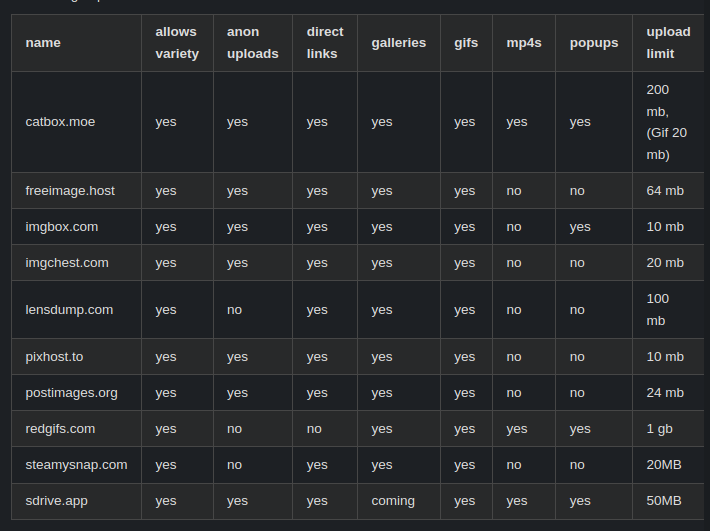
filebin : deletes after 6 days
goFile : file deletes if no one download it
goFile unofficial download: https://gist.github.com/shawnli87/d416b7c9030293cabfcf4c225cdc5a15
skiff drive : https://app.skiff.com/drive/folder : no longer exist
pcloud
filen.io : if not login in 3 months, file may get deleted fileLU : file may get deleted later
idrive : with file sync cross platform : no longer free
dropbox : with file sync cross platform
sync : with file sync cross platform except linux
https://buzzheavier.com/ (unlimited, forever, no ddl link by default)
jottacloud : 5GB https://drime.cloud/ : 20 gb free eu hosting filegarden : https://filegarden.com/ : 100mb file limit, 2gb total limit, ddl link https://mobidrive.com : 20gb free storage filespayout : 10gb free but with 10s wait for download blackbaze : 10gb s3 like cloud storage https://www.backblaze.com : no public link without credit card cloudfare r2 : s3 like, requires credit card https://filebase.com/pricing/ : 5gb storage with 5gb bandwidth koofr : 10gb (share link expire after 14 days) opendrive (5 GB | 100 MB Max File Size | 1 GB/Day Bandwidth 1 User | 200 KB/s Speed) (Supports DDL)
box : with file sync cross platform except linux
https://www.cbackup.com (10gb, 1gb/day)
for file sharing: https://0x0.st/, code: https://git.0x0.st/mia/0x0 https://www.lifewire.com/free-cloud-storage-1356638 : free cloud storages https://bytesbin.com/file-hosting-direct-download-link/ : free cloud storages with direct downloadable link https://ddownload.eu : 5tb with 30 days validity https://www.zotero.org/support/kb/webdav_services 4shared : (15 gb, 3GB daily limit, 30GB monthly limit, need to sign i to download files) scramble.cloud : 100 gb storage encrypted(some IP block it)
https://vgy.me/ : for image https://fileditch.com/ : 15gb/file perma storage filen : 10gb vloud storage end to end encyption : will get 10 gb for inviting friends (3 months of inactivity) dropbox : 500mb per referral deegoo : 20gb 1filchier : 1tb temp storage yandex disk : 5gb mega 20gb (since 2013) mediafire : 10gb(1 gb for every friend invite)(since 2006) bestfile(unlimited space, 5gb/file)(for unregistered, 1gb/file, 6months file validity) uploadnow(100 gb, cant signin)(file deletes if no one download it) blomp(20 gb to 200gb) uloz.to : (1gb, no way to make files public/sharable) : reduced from 50gb to 25gb to 1gb
-
Google DRM Dangers
- What will happen basically that google will decide that which browser, which OS, which extension u can use also forcing to use Cam and microphone
- So u can no longer block ads, extension to save our system from virus thus stealing your information and selling it.
Internet will no longer be open anymore. - Get commerce sites, banks, and digital content providers to widely adopt WEI for security benefits.
- Require use of TPM signed OS to access said sites "securely".
- Only sign systems with locked down execution environment to ensure integrity of system.
- Censorship, spying, marketing and who knows what else.
- malicious websites can then filter out traffic they don't want, and instead focus entirely on their specified victims.
- search engine scrapers being unable to gather data. so no new search engine will ever develop.
- this may affect dissidents and journalists that use secure software (TAILS, tor, etc) to communicate sensitive information. said secure software would probably not succeed a WEI test, and could thus make their work even more difficult than it is
Asking the user if they’d like to receive notifications the instant they visit a site is so dumb. As soon as the user hits no, that’s it, they’ve now been indefinitely banned from requesting that permission moving forward. Regardless of if the user might actually want it some day later on.
Safetynet will detect rooted device and block its access for banking apps
1, don't worry this is just an idea
2, don't worry this is just some personal project
3, don't worry this is just an internal discussion
4, don't worry this is just a closed test
5, yaaaaaa you have to update or you'll die, byyyyy-
chat
It's a DRM to be launched by google giving websites access to our device information.
https://m.youtube.com/watch?v=5joNRJ3C5ho&pp=ygUZU29tZW9yZGluYXJ5Z2FtaW5nIGdvb2dsZQ%3D%3D
https://github.com/RupertBenWiser/Web-Environment-Integrity/blob/main/explainer.md
ability for websites to detect your environment so that u can be trusted
-
Open source note taking
https://www.youtube.com/watch?v=P8accXNcwjs
qownnotes
appflowy for notion
anytype for notion
joplin
zimnotes : have option of exporting html but only for pc
markor : for android
nextcloud for office 365
mattermost for teams
litexl for sublime text
-
Open source project
Lime text : foss alternative of sublime text
https://www.youtube.com/watch?v=oLrwk07zZ0Y
vaultwarden : password manager
padloc : password manager (stores data in
~/.local/share/app.padloc)https://github.com/k0gen/agora-wrapper : fileHosting
podman : docker alternative
libretube : youtube mirror
peer tube : youtube alternative . its french
syncting : airdroid alternative
https://blog.space-cloud.io/posts/top-5-opensource-heroku-alternatives/
-
toggle list in markdown
<details><summary>Click me</summary> ### Heading 1. Foo 2. Bar - Baz 3. [Window Tiling in XFCE.mp4](:/b1511aa80cad4d8398847045a03c96be) ### Some Javascript ```js function logSomething(something) { console.log('Something', something); } ``` </details> -
Joplin